---
title: How to manage notification settings and preferences
description: Learn how to manage notification settings in SystemView. Access the notification centre from the bell icon to view, update, mute, or remove alerts linked to your Improvement Targets and Monitor Goals. Includes options for email/SMS delivery and links to phone number validation.
---
[Skip to content](https://academy.healthcarelogic.com/knowledge/how-to-manage-your-notification-settings-and-preferences#main-content)
[Contact Us](https://academy.healthcarelogic.com/knowledge/kb-tickets/new)
[](https://academy.healthcarelogic.com/knowledge)
- [Getting Started](https://academy.healthcarelogic.com/getting-started-with-systemview)
- [Domain Overviews](https://academy.healthcarelogic.com/learning-hub/domain-overviews)
- [On-demand Learning](https://academy.healthcarelogic.com/learning-hub/webinars/australia/on-demand-webinars)
- [Webinars](https://academy.healthcarelogic.com/learning-hub/webinars)
Open main navigation
Close main navigation
- [Getting Started](https://academy.healthcarelogic.com/getting-started-with-systemview)
- [Domain Overviews](https://academy.healthcarelogic.com/learning-hub/domain-overviews)
- [On-demand Learning](https://academy.healthcarelogic.com/learning-hub/webinars/australia/on-demand-webinars)
- [Webinars](https://academy.healthcarelogic.com/learning-hub/webinars)
- [Contact Us](https://academy.healthcarelogic.com/knowledge/kb-tickets/new)
- [Contact Us](https://info.healthcarelogic.com/contact-us)
[Contact Us](https://info.healthcarelogic.com/contact-us)
Search the Knowledge Base
- There are no suggestions because the search field is empty.
1. [SystemView Knowledge Base](https://academy.healthcarelogic.com/knowledge)
2. [Interact](https://academy.healthcarelogic.com/knowledge/interact)
3. [Using Notifications & Improvement Tools](https://academy.healthcarelogic.com/knowledge/interact#using-notifications-improvement-tools)
November 13, 2025
# How to manage notification settings and preferences
## Use the notification centre to stay on top of your targets and goals - all from one place in SystemView.
SystemView’s notification centre (the **bell icon** in the top navigation bar) is a centralised place to view and manage all your alerts. It opens a side menu on the right-hand side of the screen, and you can access it no matter where you are in SystemView. Any metrics with an **[Improvement ›](https://academy.healthcarelogic.com/knowledge/how-to-set-an-improvement-target)** target, **[Monitor ›](https://academy.healthcarelogic.com/knowledge/how-to-set-and-monitor-a-goal)** goal or [**Trigger ›**](https://academy.healthcarelogic.com/knowledge/configuring-emergency-department-los-alerts-in-systemview) set up will appear in this list, giving you a quick way to keep track of them.
💡 **When to use this feature:** Use the notification centre to easily review, adjust, or remove targets and goals without needing to navigate back through Explore.
---
### **How to use the notification centre**
**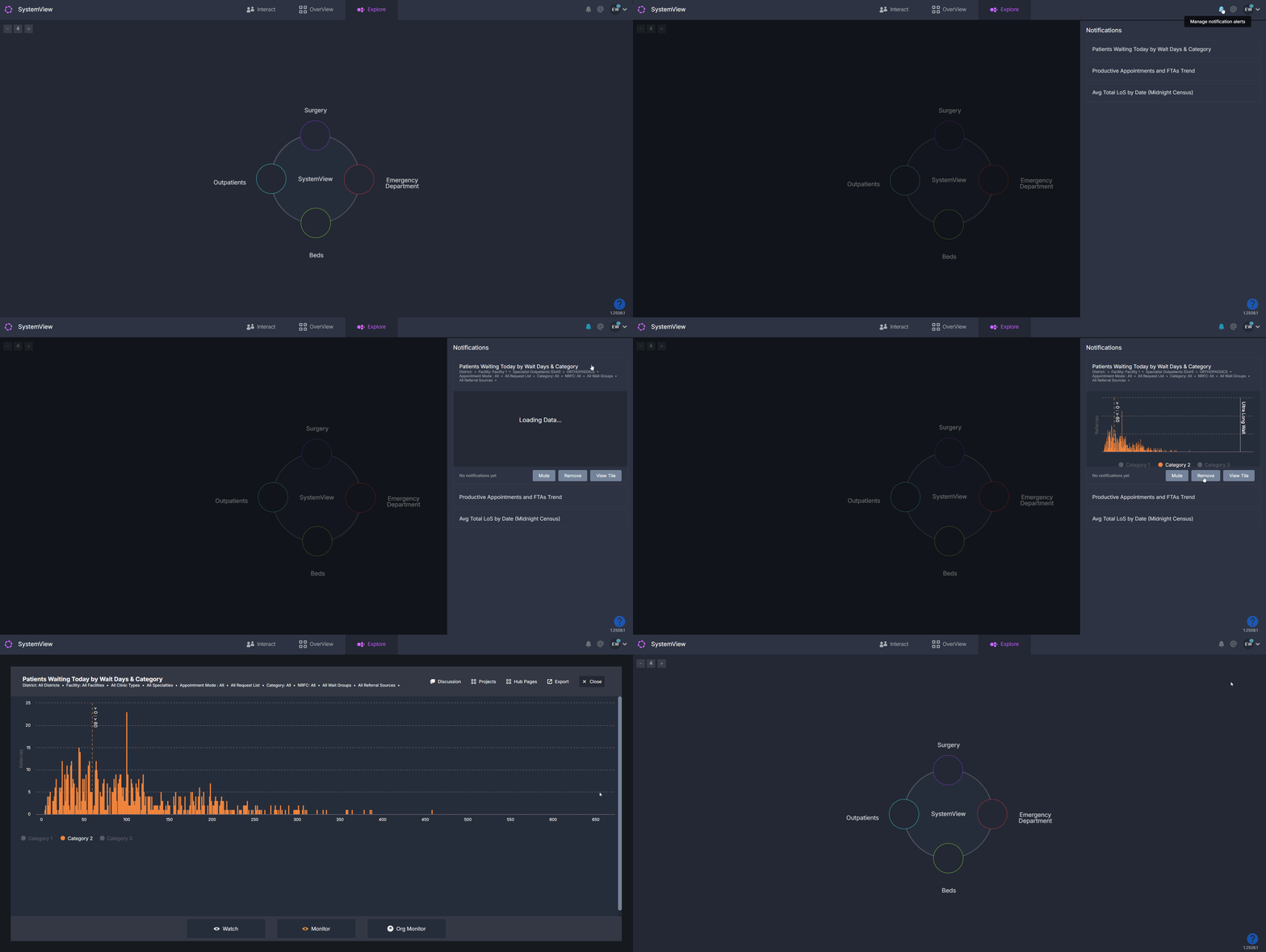**
1. Click the **bell icon** in the top navigation bar.
2. A side menu will open, listing all charts that have an Improvement Target or Monitor Goal set.
3. Select a chart from the list to open it.
4. From here, you can:
- **Mute notifications** for the chart.
- **Remove notifications** entirely (the chart will remain in your MyView space).
- **View the tile** directly.
#### **How to update notification preferences**
If you choose **View Tile**, you can go back into Improve or Monitor (depending on which was set up) and adjust the goal or notification settings as needed.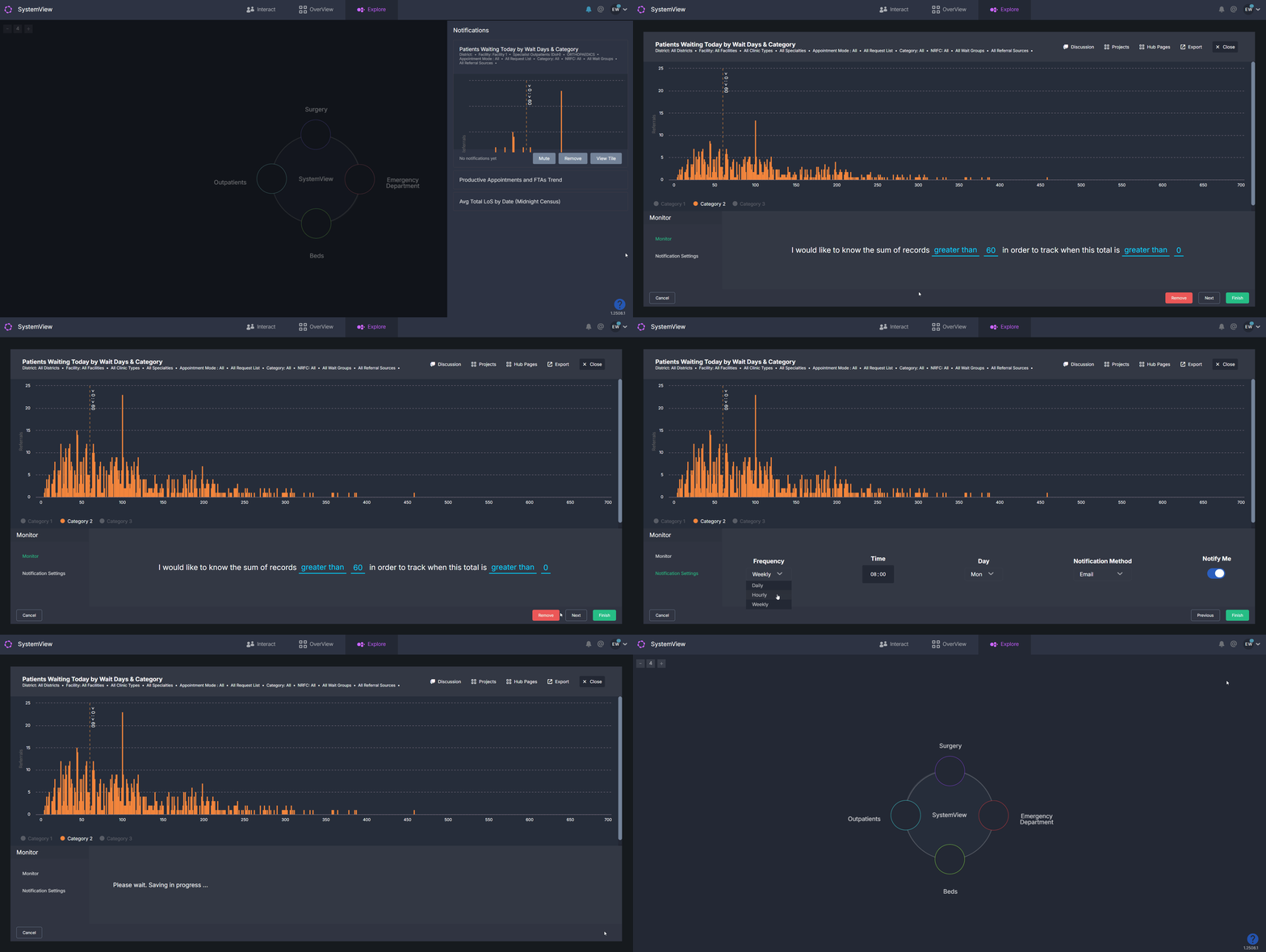
---
### **How to remove notifications**
You can remove notifications in two ways, depending on whether you want to keep your target/goal or delete it entirely:
#### **Option 1 – Remove notifications but keep the goal**
**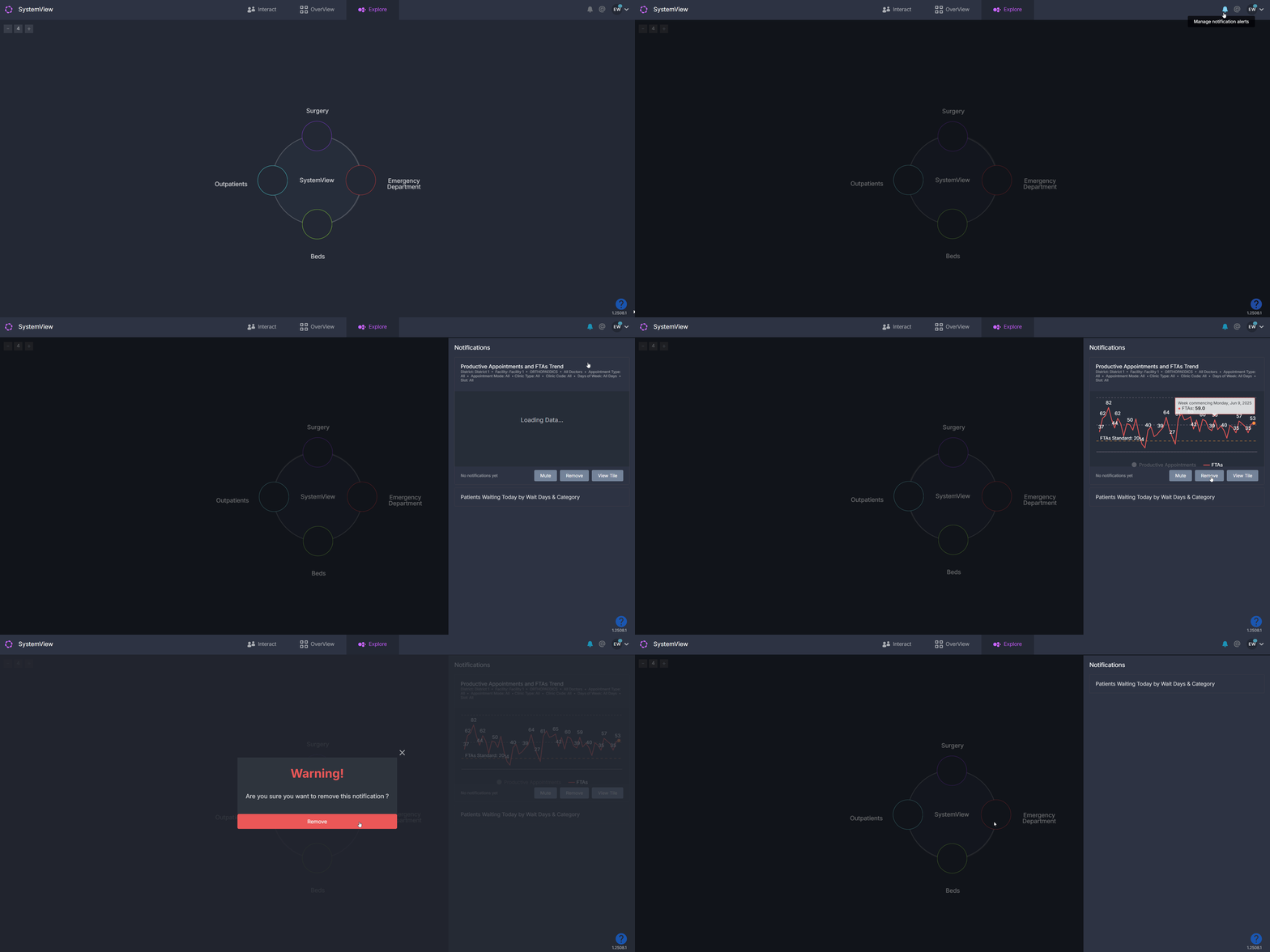**
1. Click the **bell icon** in the top navigation bar.
2. From the side menu, select the chart you want to manage.
3. Click **Remove**.
This will remove the notifications for the chart but keep the Improve or Monitor Goal in place.
#### **Option 2 – Delete the goal and all linked notifications**
**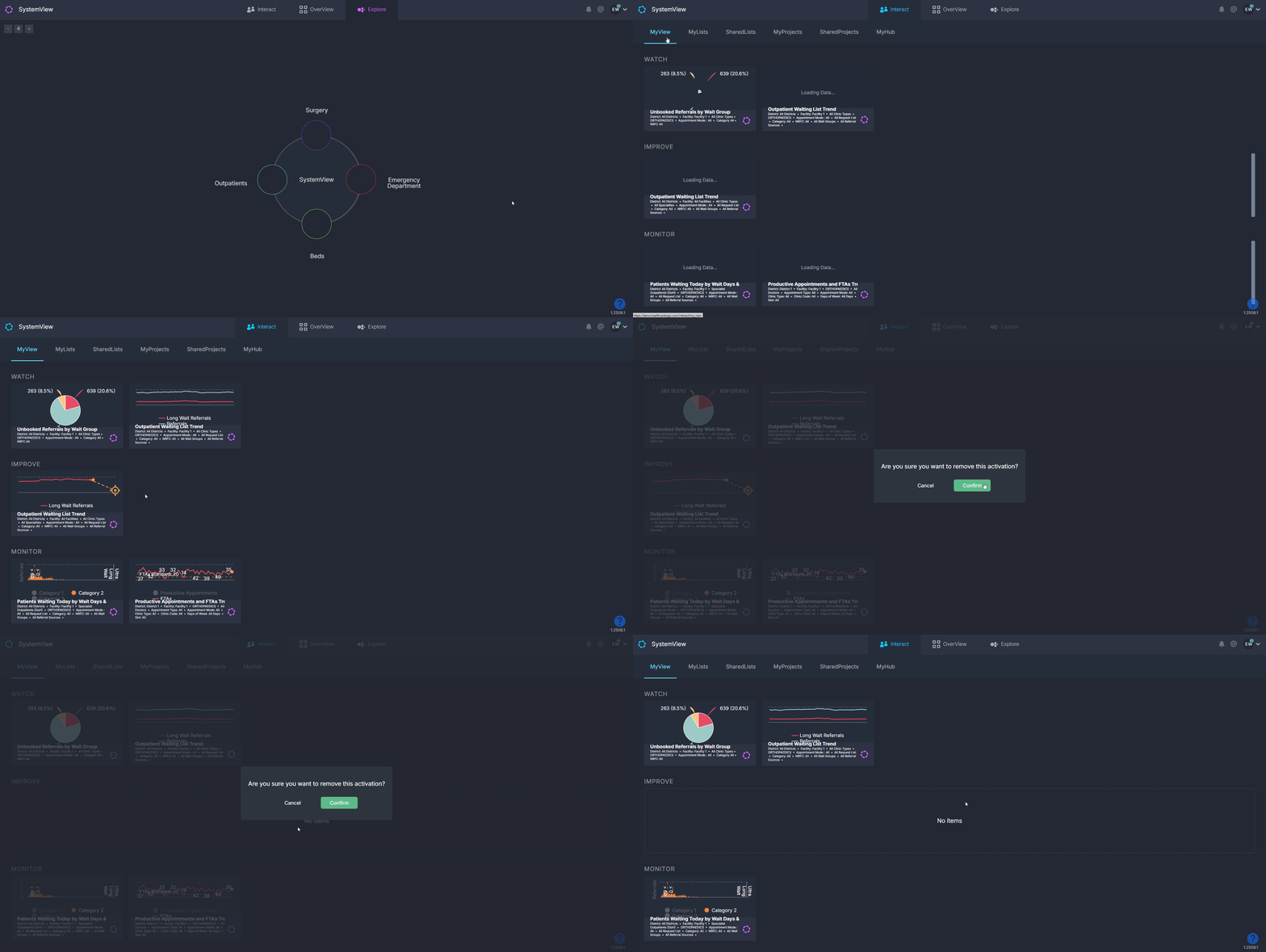**
1. Go to **Interact \> MyView**.
2. Hover over the chart with the target or goal you want to remove.
3. Click the red **X** in the top-right corner.
This will delete the Improve or Monitor Goal completely, along with any notifications set up for it.
---
### **Notification delivery options**
Notifications can be sent to either your work **email** or your work phone via **SMS**.
If you want to receive SMS alerts, your **phone number must be validated in SystemView**. See [How do I validate my phone number in SystemView? ›](https://academy.healthcarelogic.com/knowledge/how-do-i-validate-my-phone-number-in-systemview) for step-by-step instructions.
---
### **Learn more**
If you’d like to learn more about setting up notifications in SystemView, see these articles:
- [How to set an improvement target ›](https://academy.healthcarelogic.com/knowledge/how-to-set-an-improvement-target)
- [How to set and monitor a goal ›](https://academy.healthcarelogic.com/knowledge/how-to-set-and-monitor-a-goal)
- [Configuring Emergency Department LoS alerts in SystemView ›](https://academy.healthcarelogic.com/knowledge/configuring-emergency-department-los-alerts-in-systemview)
- [Getting Started](https://academy.healthcarelogic.com/knowledge/getting-started#main-content)
- [Welcome & Introduction](https://academy.healthcarelogic.com/knowledge/getting-started#welcome-introduction)
- [Access & Account Setup](https://academy.healthcarelogic.com/knowledge/getting-started#access-account-setup)
- [Basic Navigation & Layout](https://academy.healthcarelogic.com/knowledge/getting-started#basic-navigation-layout)
- [FAQs & Troubleshooting](https://academy.healthcarelogic.com/knowledge/getting-started#faqs-troubleshooting)
- [Interact](https://academy.healthcarelogic.com/knowledge/interact#main-content)
- [Interact Basics](https://academy.healthcarelogic.com/knowledge/interact#interact-basics)
- [Customising SystemView](https://academy.healthcarelogic.com/knowledge/interact#customising-systemview)
- [Sharing & Duplicating Content](https://academy.healthcarelogic.com/knowledge/interact#sharing-duplicating-content)
- [Using Notifications & Improvement Tools](https://academy.healthcarelogic.com/knowledge/interact#using-notifications-improvement-tools)
- [Surgery](https://academy.healthcarelogic.com/knowledge/surgery#main-content)
- [Introduction & Terminology](https://academy.healthcarelogic.com/knowledge/surgery#introduction-terminology)
- [Waiting List Management](https://academy.healthcarelogic.com/knowledge/surgery#waiting-list-management)
- [Scheduling & Booking Management](https://academy.healthcarelogic.com/knowledge/surgery#scheduling-booking-management)
- [Performance & Activity Analysis](https://academy.healthcarelogic.com/knowledge/surgery#performance-activity-analysis)
- [Emergency Surgery](https://academy.healthcarelogic.com/knowledge/surgery#emergency-surgery)
- [FAQs & Troubleshooting](https://academy.healthcarelogic.com/knowledge/surgery#faqs-troubleshooting)
- [Outpatients](https://academy.healthcarelogic.com/knowledge/outpatients#main-content)
- [Introduction & Terminology](https://academy.healthcarelogic.com/knowledge/outpatients#introduction-terminology)
- [Waiting List Management](https://academy.healthcarelogic.com/knowledge/outpatients#waiting-list-management)
- [Referral Management](https://academy.healthcarelogic.com/knowledge/outpatients#referral-management)
- [Wait Times](https://academy.healthcarelogic.com/knowledge/outpatients#wait-times)
- [Demand & Capacity Planning](https://academy.healthcarelogic.com/knowledge/outpatients#demand-capacity-planning)
- [Bookings & Reviews](https://academy.healthcarelogic.com/knowledge/outpatients#bookings-reviews)
- [Clinic Effectiveness & Appointment Outcomes](https://academy.healthcarelogic.com/knowledge/outpatients#clinic-effectiveness-appointment-outcomes)
- [Virtual Learning & Tools](https://academy.healthcarelogic.com/knowledge/outpatients#virtual-learning-tools)
- [Beds](https://academy.healthcarelogic.com/knowledge/beds#main-content)
- [Introduction & Foundations](https://academy.healthcarelogic.com/knowledge/beds#introduction-foundations)
- [Inpatient Demand & Capacity](https://academy.healthcarelogic.com/knowledge/beds#inpatient-demand-capacity)
- [Complex Patients Management](https://academy.healthcarelogic.com/knowledge/beds#complex-patients-management)
- [Risk of Hospitalisation & Readmissions](https://academy.healthcarelogic.com/knowledge/beds#risk-of-hospitalisation-readmissions)
- [Length of Stay & Inpatient Flow](https://academy.healthcarelogic.com/knowledge/beds#length-of-stay-inpatient-flow)
- [Inpatient Occupancy Forecaster](https://academy.healthcarelogic.com/knowledge/beds#inpatient-occupancy-forecaster)
- [Emergency Department](https://academy.healthcarelogic.com/knowledge/emergency-department#main-content)
- [Introduction & Foundations](https://academy.healthcarelogic.com/knowledge/emergency-department#introduction-foundations)
- [Department Now](https://academy.healthcarelogic.com/knowledge/emergency-department#department-now)
- [Flow Monitor](https://academy.healthcarelogic.com/knowledge/emergency-department#flow-monitor)
- [Performance Trends & Analytics](https://academy.healthcarelogic.com/knowledge/emergency-department#performance-trends-analytics)
- [Virtual Learning & Tools](https://academy.healthcarelogic.com/knowledge/emergency-department#virtual-learning-tools)
- [FAQs & Troubleshooting](https://academy.healthcarelogic.com/knowledge/emergency-department#faqs-troubleshooting)
- [SystemView 2](https://academy.healthcarelogic.com/knowledge/systemview-2)
- [System Administration](https://academy.healthcarelogic.com/knowledge/system-administration)
- [Patient Cohorts](https://academy.healthcarelogic.com/knowledge/patient-cohorts#main-content)
- [Beds](https://academy.healthcarelogic.com/knowledge/patient-cohorts#beds)
- [Emergency Department](https://academy.healthcarelogic.com/knowledge/patient-cohorts#emergency-department)
- [Release Notes](https://academy.healthcarelogic.com/knowledge/release-notes)
[](https://healthcarelogic.com/)
[mailto:customersuccess@healthcarelogic.com](mailto:customersuccess@healthcarelogic.com)
© 2026 HealthCare Logic. All rights reserved
**Didn't find what you were looking for?**
[Raise a support ticket](https://academy.healthcarelogic.com/knowledge/kb-tickets/new) and our team will come back to you. For guided training try the [Learning Hub](https://academy.healthcarelogic.com/learning-hub), or catch up on a [past webinar](https://academy.healthcarelogic.com/learning-hub/webinars).