---
title: SystemView Release Notes v1.2607.1 (July/August 2026)
description: "SystemView v1.2607.1: delayed discharge tracking in Complex Patients, multi-select complexity types and reasons, plus fixes across Beds and exports."
---
[Skip to content](https://academy.healthcarelogic.com/knowledge/release-notes/systemview-v1-2607-1#main-content)
[Contact Us](https://academy.healthcarelogic.com/knowledge/kb-tickets/new)
[](https://academy.healthcarelogic.com/knowledge)
- [Getting Started](https://academy.healthcarelogic.com/getting-started-with-systemview)
- [Domain Overviews](https://academy.healthcarelogic.com/learning-hub/domain-overviews)
- [On-demand Learning](https://academy.healthcarelogic.com/learning-hub/webinars/australia/on-demand-webinars)
- [Webinars](https://academy.healthcarelogic.com/learning-hub/webinars)
Open main navigation
Close main navigation
- [Getting Started](https://academy.healthcarelogic.com/getting-started-with-systemview)
- [Domain Overviews](https://academy.healthcarelogic.com/learning-hub/domain-overviews)
- [On-demand Learning](https://academy.healthcarelogic.com/learning-hub/webinars/australia/on-demand-webinars)
- [Webinars](https://academy.healthcarelogic.com/learning-hub/webinars)
- [Contact Us](https://academy.healthcarelogic.com/knowledge/kb-tickets/new)
- [Contact Us](https://info.healthcarelogic.com/contact-us)
[Contact Us](https://info.healthcarelogic.com/contact-us)
Search the Knowledge Base
- There are no suggestions because the search field is empty.
1. [SystemView Knowledge Base](https://academy.healthcarelogic.com/knowledge)
2. [Release Notes](https://academy.healthcarelogic.com/knowledge/release-notes)
August 10, 2026
# SystemView Release Notes v1.2607.1 (July/August 2026)
## Delayed discharge tracking in Complex Patients, multi-select complexity types and reasons, and fixes across Beds, exports and My Hub.
This release is centred on Complex Patients. The headline changes help ward and patient flow teams see which patients are clinically fit for discharge, how long they have been waiting, and why they are still in a bed.
***Some items depend on your health service's deployment and configuration. If you're unsure if they apply to your site, you can always check with us at customersuccess@healthcarelogic.com.***
### Track delayed discharges in Complex Patients
Complex Patients now records a Clinically Fit for Discharge (CFD) date, with an automatically calculated Days Since Clinically Fit for Discharge column across the Register, Escalation List and Trends. A new Clinically Fit for Discharge filter (Yes / No / blank) isolates delayed discharge patients in one click.
This gives operational staff direct visibility of when a patient became fit for discharge and how long they have been waiting, without needing a separate register or data exports. CFD data flows through to Trends for aggregate reporting.
**Where to find it:** Complex Patient Register\> Complex Patient Escalation List and Trends
**Learn more:** [Beds guides on the Knowledge Base](https://academy.healthcarelogic.com/knowledge/beds) · [Watch a webinar](https://academy.healthcarelogic.com/learning-hub/webinars/australia)
### Record more than one complexity factor per patient
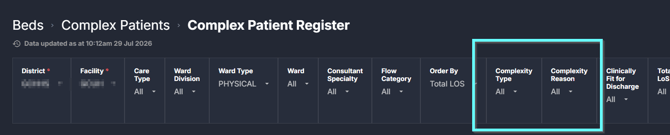
Complexity Type and Complexity Reason are now multi-select. Clinicians can record multiple complexity types and discharge barriers for a patient in a single action, which better reflects real clinical complexity. Existing values have been migrated automatically, so there is nothing to re-enter.
**Where to find it:** Beds \> Complex Patients \> Register, Escalation List and Trends
**
### Filter and sort Complex Patients the way you work
- A new Complexity Reason filter lets you filter by discharge barrier directly, independently of Complexity Type, with no export needed.
- Filters now cascade: the Patient, Total Length of Stay and Case Management dropdowns only show values that return results.
- New Order By options: Ward and Bed Number, Admission Date (oldest first), Previous Complex Patient, and Treating Team. Useful for ward rounds and escalation meetings.
**Where to find it:** Beds \> Complex Patients \> Complex Patients Register
### Historical LoS Trends inside Patient Cohorts
Historical Length of Stay Trends from the Beds domain are now available directly within the Patient Cohorts workflow, so you can see how long-stay patients are trending without navigating to a separate Beds component. *Availability depends on your deployment.*
*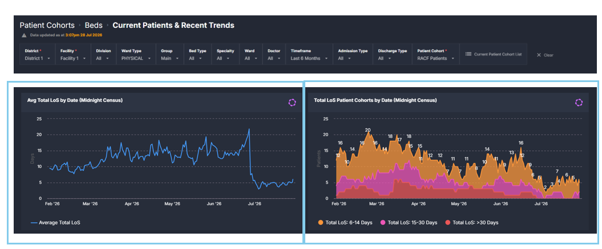*
**Where to find it:** Patient Cohorts \> Beds \> Current Paitents & Recent Trends
**Learn more:** [Patient Cohorts guides on the Knowledge Base](https://academy.healthcarelogic.com/knowledge/patient-cohorts)
### Hours Until Breach now reflects clinical priority
The Clinical Priority Hours logic behind Hours Until Breach on the Emergencies Now list has been updated, so the time remaining shown accurately reflects each patient's clinical priority category. *Availability depends on your deployment.*
**Where to find it:** Surgery \> Emergency Operations \> Emergencies Now
**Learn more:** [Surgery guides on the Knowledge Base](https://academy.healthcarelogic.com/knowledge/surgery)
### Fixes in this release
| Area | What's fixed |
| --- | --- |
| Beds \> Complex Patients \> Register, Trends | Age filter works again and tile counts are consistent across the application |
| Beds \> LoS Trends & Ward Dynamics | Occupancy totals now reconcile across all filter combinations |
| Beds \> Ward Mapping | Reinstated wards keep their correct mappings |
| Beds \> Bed Capacity Monitor | Hospital filter selection works correctly |
| Beds \> Complex Patients \> Register (exports) | Complexity Type and Reason values export as clean text |
| MyHub | Removed the black page that could appear under active tiles |
### Keep learning
- [Learning Hub](https://academy.healthcarelogic.com/learning-hub): walkthroughs, domain overviews and guided resources.
- [Webinars](https://academy.healthcarelogic.com/learning-hub/webinars/australia): live sessions and on-demand recordings on key features and domains.
Questions or feedback? Contact us at customersuccess@healthcarelogic.com.
---
- [Getting Started](https://academy.healthcarelogic.com/knowledge/getting-started#main-content)
- [Welcome & Introduction](https://academy.healthcarelogic.com/knowledge/getting-started#welcome-introduction)
- [Access & Account Setup](https://academy.healthcarelogic.com/knowledge/getting-started#access-account-setup)
- [Basic Navigation & Layout](https://academy.healthcarelogic.com/knowledge/getting-started#basic-navigation-layout)
- [FAQs & Troubleshooting](https://academy.healthcarelogic.com/knowledge/getting-started#faqs-troubleshooting)
- [Interact](https://academy.healthcarelogic.com/knowledge/interact#main-content)
- [Interact Basics](https://academy.healthcarelogic.com/knowledge/interact#interact-basics)
- [Customising SystemView](https://academy.healthcarelogic.com/knowledge/interact#customising-systemview)
- [Sharing & Duplicating Content](https://academy.healthcarelogic.com/knowledge/interact#sharing-duplicating-content)
- [Using Notifications & Improvement Tools](https://academy.healthcarelogic.com/knowledge/interact#using-notifications-improvement-tools)
- [Surgery](https://academy.healthcarelogic.com/knowledge/surgery#main-content)
- [Introduction & Terminology](https://academy.healthcarelogic.com/knowledge/surgery#introduction-terminology)
- [Waiting List Management](https://academy.healthcarelogic.com/knowledge/surgery#waiting-list-management)
- [Scheduling & Booking Management](https://academy.healthcarelogic.com/knowledge/surgery#scheduling-booking-management)
- [Performance & Activity Analysis](https://academy.healthcarelogic.com/knowledge/surgery#performance-activity-analysis)
- [Emergency Surgery](https://academy.healthcarelogic.com/knowledge/surgery#emergency-surgery)
- [FAQs & Troubleshooting](https://academy.healthcarelogic.com/knowledge/surgery#faqs-troubleshooting)
- [Outpatients](https://academy.healthcarelogic.com/knowledge/outpatients#main-content)
- [Introduction & Terminology](https://academy.healthcarelogic.com/knowledge/outpatients#introduction-terminology)
- [Waiting List Management](https://academy.healthcarelogic.com/knowledge/outpatients#waiting-list-management)
- [Referral Management](https://academy.healthcarelogic.com/knowledge/outpatients#referral-management)
- [Wait Times](https://academy.healthcarelogic.com/knowledge/outpatients#wait-times)
- [Demand & Capacity Planning](https://academy.healthcarelogic.com/knowledge/outpatients#demand-capacity-planning)
- [Bookings & Reviews](https://academy.healthcarelogic.com/knowledge/outpatients#bookings-reviews)
- [Clinic Effectiveness & Appointment Outcomes](https://academy.healthcarelogic.com/knowledge/outpatients#clinic-effectiveness-appointment-outcomes)
- [Virtual Learning & Tools](https://academy.healthcarelogic.com/knowledge/outpatients#virtual-learning-tools)
- [Beds](https://academy.healthcarelogic.com/knowledge/beds#main-content)
- [Introduction & Foundations](https://academy.healthcarelogic.com/knowledge/beds#introduction-foundations)
- [Inpatient Demand & Capacity](https://academy.healthcarelogic.com/knowledge/beds#inpatient-demand-capacity)
- [Complex Patients Management](https://academy.healthcarelogic.com/knowledge/beds#complex-patients-management)
- [Risk of Hospitalisation & Readmissions](https://academy.healthcarelogic.com/knowledge/beds#risk-of-hospitalisation-readmissions)
- [Length of Stay & Inpatient Flow](https://academy.healthcarelogic.com/knowledge/beds#length-of-stay-inpatient-flow)
- [Inpatient Occupancy Forecaster](https://academy.healthcarelogic.com/knowledge/beds#inpatient-occupancy-forecaster)
- [Emergency Department](https://academy.healthcarelogic.com/knowledge/emergency-department#main-content)
- [Introduction & Foundations](https://academy.healthcarelogic.com/knowledge/emergency-department#introduction-foundations)
- [Department Now](https://academy.healthcarelogic.com/knowledge/emergency-department#department-now)
- [Flow Monitor](https://academy.healthcarelogic.com/knowledge/emergency-department#flow-monitor)
- [Performance Trends & Analytics](https://academy.healthcarelogic.com/knowledge/emergency-department#performance-trends-analytics)
- [Virtual Learning & Tools](https://academy.healthcarelogic.com/knowledge/emergency-department#virtual-learning-tools)
- [FAQs & Troubleshooting](https://academy.healthcarelogic.com/knowledge/emergency-department#faqs-troubleshooting)
- [SystemView 2](https://academy.healthcarelogic.com/knowledge/systemview-2)
- [System Administration](https://academy.healthcarelogic.com/knowledge/system-administration)
- [Patient Cohorts](https://academy.healthcarelogic.com/knowledge/patient-cohorts#main-content)
- [Beds](https://academy.healthcarelogic.com/knowledge/patient-cohorts#beds)
- [Emergency Department](https://academy.healthcarelogic.com/knowledge/patient-cohorts#emergency-department)
- [Release Notes](https://academy.healthcarelogic.com/knowledge/release-notes)
[](https://healthcarelogic.com/)
[mailto:customersuccess@healthcarelogic.com](mailto:customersuccess@healthcarelogic.com)
© 2026 HealthCare Logic. All rights reserved
**Didn't find what you were looking for?**
[Raise a support ticket](https://academy.healthcarelogic.com/knowledge/kb-tickets/new) and our team will come back to you. For guided training try the [Learning Hub](https://academy.healthcarelogic.com/learning-hub), or catch up on a [past webinar](https://academy.healthcarelogic.com/learning-hub/webinars).