---
title: Waiting List > Maximum Waiting Time Summary
description: Monitor patients waiting beyond maximum wait time thresholds, track week-to-week changes, and assess performance trends across hospitals and specialties in SystemView.
---
[Skip to content](https://academy.healthcarelogic.com/knowledge/surgery-waiting-list-maximum-waiting-time-summary#main-content)
[Contact Us](https://academy.healthcarelogic.com/knowledge/kb-tickets/new)
[](https://academy.healthcarelogic.com/knowledge)
- [Getting Started](https://academy.healthcarelogic.com/getting-started-with-systemview)
- [Domain Overviews](https://academy.healthcarelogic.com/learning-hub/domain-overviews)
- [On-demand Learning](https://academy.healthcarelogic.com/learning-hub/webinars/australia/on-demand-webinars)
- [Webinars](https://academy.healthcarelogic.com/learning-hub/webinars)
Open main navigation
Close main navigation
- [Getting Started](https://academy.healthcarelogic.com/getting-started-with-systemview)
- [Domain Overviews](https://academy.healthcarelogic.com/learning-hub/domain-overviews)
- [On-demand Learning](https://academy.healthcarelogic.com/learning-hub/webinars/australia/on-demand-webinars)
- [Webinars](https://academy.healthcarelogic.com/learning-hub/webinars)
- [Contact Us](https://academy.healthcarelogic.com/knowledge/kb-tickets/new)
- [Contact Us](https://info.healthcarelogic.com/contact-us)
[Contact Us](https://info.healthcarelogic.com/contact-us)
Search the Knowledge Base
- There are no suggestions because the search field is empty.
1. [SystemView Knowledge Base](https://academy.healthcarelogic.com/knowledge)
2. [Surgery](https://academy.healthcarelogic.com/knowledge/surgery)
3. [Waiting List Management](https://academy.healthcarelogic.com/knowledge/surgery#waiting-list-management)
April 28, 2026
# Waiting List \> Maximum Waiting Time Summary
## Monitor long waiters against maximum wait time targets and track changes over time.
#### **Location in SystemView:** Surgery \> Waiting List \> Maximum Waiting Time Summary
**In this article**
- [What it is](https://academy.healthcarelogic.com/knowledge/surgery-waiting-list-maximum-waiting-time-summary#What-is-it)
- [Why it matters](https://academy.healthcarelogic.com/knowledge/surgery-waiting-list-maximum-waiting-time-summary#Why-it-matters)
- [How to use it](https://academy.healthcarelogic.com/knowledge/surgery-waiting-list-maximum-waiting-time-summary#How-to-use-it)
- [How it works](https://academy.healthcarelogic.com/knowledge/surgery-waiting-list-maximum-waiting-time-summary#How-it-works)
- [How it helps you](https://academy.healthcarelogic.com/knowledge/surgery-waiting-list-maximum-waiting-time-summary#How-it-helps)
- [Best practices](https://academy.healthcarelogic.com/knowledge/surgery-waiting-list-maximum-waiting-time-summary#Best-practices)
- [FAQs](https://academy.healthcarelogic.com/knowledge/surgery-waiting-list-maximum-waiting-time-summary#FAQs)
---
### **What it is**
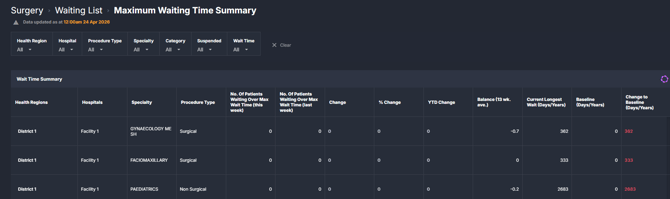
The Maximum Waiting Time Summary component provides a consolidated view of patients waiting beyond a selected maximum wait time threshold. It compares the current week to the previous week and tracks changes over time, including year-to-date movement and comparison to a defined baseline.
It also highlights the longest waiting patient and how that has changed relative to a baseline point.
**
---
### **Why it matters**
*Track and reduce long waits by making changes visible over time.*
This component supports visibility of patients exceeding target wait times and how this is evolving week to week and across the year.
- Monitor the number of patients waiting above maximum wait time thresholds
- Identify whether performance is improving or deteriorating week to week
- Track progress against a baseline position
- Highlight specialties or hospitals with the longest waits
---
### **How to use it**
#### **Filter to focus your view**
Use the filter bar to refine the cohort being analysed:
- **Health Region**: View data for a specific region
- **Hospital**: Focus on an individual facility
- **Procedure Type**: Filter by surgical or non-surgical procedures
- **Specialty**: Drill down into a specific specialty
- **Category**: Filter by clinical urgency category
- **Suspended**: Include or exclude suspended patients
- **Wait Time**: Select the maximum wait time threshold (for example 10 or 12 weeks, 6, 9, 12 or 15 months, or 4 years)
#### **Review long wait performance and changes**
| Tile / Chart Name | What it shows |
| --- | --- |
| Wait Time Summary | A table summarising patients waiting above the selected maximum wait time threshold, broken down by Health Region, Hospital, Specialty, and Procedure Type. Includes week-on-week comparison, percentage change, year-to-date movement, and longest wait metrics. |
#### **Table columns explained**
- **No. of Patients Waiting Over Max Wait Time (this week)**: Count of patients currently exceeding the selected wait time threshold
- **No. of Patients Waiting Over Max Wait Time (last week)**: Count from the previous week for comparison
- **Change**: Numerical difference between this week and last week
- **% Change**: Percentage change between weeks
- **YTD Change**: Change in the number of long waiters since the start of the reporting year
- **Balance (13 wk. ave.)**: Average weekly change in long waiters over the past 13 weeks, indicating trend direction
- **Current Longest Wait (Days/Years)**: The longest current waiting time for an individual patient
- **Baseline (Days/Years)**: The longest wait at a defined baseline point in time
- **Change to Baseline (Days/Years)**: Difference between the current longest wait and the baseline value
---
### **How it works**
The component draws on waiting list data from the surgical source system and aggregates it by hospital and specialty.
- Data is updated daily
- Patients are assessed against the selected maximum wait time threshold
- Weekly comparisons are calculated using current and prior week snapshots
- Year-to-date change reflects cumulative movement over the reporting period
- Longest wait values identify the maximum individual waiting time in the cohort
Maximum wait time thresholds align with defined targets, such as Sláintecare wait time targets where applicable
---
### **How it helps you**
- **Monitor long waiters**: Quickly see how many patients are exceeding target timeframes
- **Track performance trends**: Compare current performance to last week and over time
- **Assess improvement against baseline**: Understand whether longest waits are reducing
- **Identify variation**: Spot differences across hospitals and specialties
- **Support planning discussions**: Use trend and balance data to inform operational decisions
---
### **Best practices**
#### **How often should I use it?**
| What to do | How often | Who typically does this | Why it helps |
| --- | --- | --- | --- |
| Review long wait counts and weekly change | **Weekly** | Waiting List Managers, Operations Managers | Tracks whether performance is improving or deteriorating |
| Monitor longest waiting patients | **Weekly** | Specialty leads, service managers | Highlights risk areas and extreme waits |
| Compare against baseline and YTD trends | **Monthly** | Executives, General Managers | Supports performance reporting and progress tracking |
| Filter by specialty or hospital | **As needed** | Operational and strategic users | Identifies where targeted action may be required |
---
### **FAQs**
**What does “Maximum Wait Time” refer to?**
Maximum wait time refers to the selected threshold used to define long waiters, typically aligned to national or local targets.
**What is the “Longest Wait”?**
The longest wait represents the individual patient with the highest waiting time in the selected cohort.
**Why might my numbers change week to week?**
Changes reflect patients being added to or removed from the waiting list, as well as movement across wait time thresholds.
- [Getting Started](https://academy.healthcarelogic.com/knowledge/getting-started#main-content)
- [Welcome & Introduction](https://academy.healthcarelogic.com/knowledge/getting-started#welcome-introduction)
- [Access & Account Setup](https://academy.healthcarelogic.com/knowledge/getting-started#access-account-setup)
- [Basic Navigation & Layout](https://academy.healthcarelogic.com/knowledge/getting-started#basic-navigation-layout)
- [FAQs & Troubleshooting](https://academy.healthcarelogic.com/knowledge/getting-started#faqs-troubleshooting)
- [Interact](https://academy.healthcarelogic.com/knowledge/interact#main-content)
- [Interact Basics](https://academy.healthcarelogic.com/knowledge/interact#interact-basics)
- [Customising SystemView](https://academy.healthcarelogic.com/knowledge/interact#customising-systemview)
- [Sharing & Duplicating Content](https://academy.healthcarelogic.com/knowledge/interact#sharing-duplicating-content)
- [Using Notifications & Improvement Tools](https://academy.healthcarelogic.com/knowledge/interact#using-notifications-improvement-tools)
- [Surgery](https://academy.healthcarelogic.com/knowledge/surgery#main-content)
- [Introduction & Terminology](https://academy.healthcarelogic.com/knowledge/surgery#introduction-terminology)
- [Waiting List Management](https://academy.healthcarelogic.com/knowledge/surgery#waiting-list-management)
- [Scheduling & Booking Management](https://academy.healthcarelogic.com/knowledge/surgery#scheduling-booking-management)
- [Performance & Activity Analysis](https://academy.healthcarelogic.com/knowledge/surgery#performance-activity-analysis)
- [Emergency Surgery](https://academy.healthcarelogic.com/knowledge/surgery#emergency-surgery)
- [FAQs & Troubleshooting](https://academy.healthcarelogic.com/knowledge/surgery#faqs-troubleshooting)
- [Outpatients](https://academy.healthcarelogic.com/knowledge/outpatients#main-content)
- [Introduction & Terminology](https://academy.healthcarelogic.com/knowledge/outpatients#introduction-terminology)
- [Waiting List Management](https://academy.healthcarelogic.com/knowledge/outpatients#waiting-list-management)
- [Referral Management](https://academy.healthcarelogic.com/knowledge/outpatients#referral-management)
- [Wait Times](https://academy.healthcarelogic.com/knowledge/outpatients#wait-times)
- [Demand & Capacity Planning](https://academy.healthcarelogic.com/knowledge/outpatients#demand-capacity-planning)
- [Bookings & Reviews](https://academy.healthcarelogic.com/knowledge/outpatients#bookings-reviews)
- [Clinic Effectiveness & Appointment Outcomes](https://academy.healthcarelogic.com/knowledge/outpatients#clinic-effectiveness-appointment-outcomes)
- [Virtual Learning & Tools](https://academy.healthcarelogic.com/knowledge/outpatients#virtual-learning-tools)
- [Beds](https://academy.healthcarelogic.com/knowledge/beds#main-content)
- [Introduction & Foundations](https://academy.healthcarelogic.com/knowledge/beds#introduction-foundations)
- [Inpatient Demand & Capacity](https://academy.healthcarelogic.com/knowledge/beds#inpatient-demand-capacity)
- [Complex Patients Management](https://academy.healthcarelogic.com/knowledge/beds#complex-patients-management)
- [Risk of Hospitalisation & Readmissions](https://academy.healthcarelogic.com/knowledge/beds#risk-of-hospitalisation-readmissions)
- [Length of Stay & Inpatient Flow](https://academy.healthcarelogic.com/knowledge/beds#length-of-stay-inpatient-flow)
- [Inpatient Occupancy Forecaster](https://academy.healthcarelogic.com/knowledge/beds#inpatient-occupancy-forecaster)
- [Emergency Department](https://academy.healthcarelogic.com/knowledge/emergency-department#main-content)
- [Introduction & Foundations](https://academy.healthcarelogic.com/knowledge/emergency-department#introduction-foundations)
- [Department Now](https://academy.healthcarelogic.com/knowledge/emergency-department#department-now)
- [Flow Monitor](https://academy.healthcarelogic.com/knowledge/emergency-department#flow-monitor)
- [Performance Trends & Analytics](https://academy.healthcarelogic.com/knowledge/emergency-department#performance-trends-analytics)
- [Virtual Learning & Tools](https://academy.healthcarelogic.com/knowledge/emergency-department#virtual-learning-tools)
- [FAQs & Troubleshooting](https://academy.healthcarelogic.com/knowledge/emergency-department#faqs-troubleshooting)
- [SystemView 2](https://academy.healthcarelogic.com/knowledge/systemview-2)
- [System Administration](https://academy.healthcarelogic.com/knowledge/system-administration)
- [Patient Cohorts](https://academy.healthcarelogic.com/knowledge/patient-cohorts#main-content)
- [Beds](https://academy.healthcarelogic.com/knowledge/patient-cohorts#beds)
- [Emergency Department](https://academy.healthcarelogic.com/knowledge/patient-cohorts#emergency-department)
- [Release Notes](https://academy.healthcarelogic.com/knowledge/release-notes)
[](https://healthcarelogic.com/)
[mailto:customersuccess@healthcarelogic.com](mailto:customersuccess@healthcarelogic.com)
© 2026 HealthCare Logic. All rights reserved
**Didn't find what you were looking for?**
[Raise a support ticket](https://academy.healthcarelogic.com/knowledge/kb-tickets/new) and our team will come back to you. For guided training try the [Learning Hub](https://academy.healthcarelogic.com/learning-hub), or catch up on a [past webinar](https://academy.healthcarelogic.com/learning-hub/webinars).