---
title: SystemView 2 – Infrastructure Summary
description: SystemView 2
---
[Skip to content](https://academy.healthcarelogic.com/knowledge/systemview-2-infrastructure-summary-#main-content)
[Contact Us](https://academy.healthcarelogic.com/knowledge/kb-tickets/new)
[](https://academy.healthcarelogic.com/knowledge)
- [Getting Started](https://academy.healthcarelogic.com/getting-started-with-systemview)
- [Domain Overviews](https://academy.healthcarelogic.com/learning-hub/domain-overviews)
- [On-demand Learning](https://academy.healthcarelogic.com/learning-hub/webinars/australia/on-demand-webinars)
- [Webinars](https://academy.healthcarelogic.com/learning-hub/webinars)
Open main navigation
Close main navigation
- [Getting Started](https://academy.healthcarelogic.com/getting-started-with-systemview)
- [Domain Overviews](https://academy.healthcarelogic.com/learning-hub/domain-overviews)
- [On-demand Learning](https://academy.healthcarelogic.com/learning-hub/webinars/australia/on-demand-webinars)
- [Webinars](https://academy.healthcarelogic.com/learning-hub/webinars)
- [Contact Us](https://academy.healthcarelogic.com/knowledge/kb-tickets/new)
- [Contact Us](https://info.healthcarelogic.com/contact-us)
[Contact Us](https://info.healthcarelogic.com/contact-us)
Search the Knowledge Base
- There are no suggestions because the search field is empty.
1. [SystemView Knowledge Base](https://academy.healthcarelogic.com/knowledge)
2. [SystemView 2](https://academy.healthcarelogic.com/knowledge/systemview-2)
February 18, 2026
# SystemView 2 – Infrastructure Summary
## For more information on SystemView 2, please contact your Customer Success Manager
### Overview
SystemView 2 is an enterprise-grade analytics platform designed to operate across hospital environments. The platform is deployed on your infrastructure, giving you complete control over your data whilst delivering powerful operational intelligence.
Platform performance, stability, and upgrade resilience are directly dependent on compliant infrastructure. This article provides a high-level summary of the infrastructure standards required to support SystemView 2.
For full technical specifications, see: **SystemView 2 – Technical Infrastructure Requirements**
### Architecture Overview
SystemView 2 deploys on Azure infrastructure, integrating with your existing hospital data sources whilst maintaining complete data sovereignty. The following diagram illustrates a typical deployment architecture.
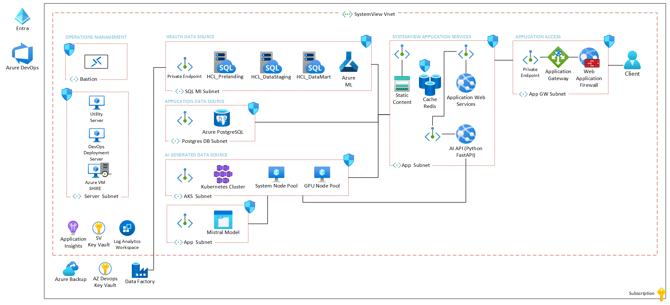
*Figure 1: SystemView 2 reference architecture on Microsoft Azure showing key components, network segmentation, and data flow. Your deployment will be tailored during technical planning based on your specific requirements.*
### Mandatory Deployment Requirements
All SystemView 2 deployments require:
- Four environments: Development, Test, UAT, Production
- Multi-node Kubernetes cluster (minimum 7 nodes per environment)
- CSI-compliant storage with Premium SSD for user-facing and analytics workloads
- Workload isolation for medium and large hospital deployments (≥1000 beds)
### Environment Provisioning
For new installations, the Development environment is required first to support initial configuration and integration development. Test, UAT, and Production environments may be provisioned later based on agreed timelines. This phased approach must be discussed during project initiation phase.
### Infrastructure Sizing Bands
Infrastructure requirements are based on a typical deployment supporting approximately 1,750 hospital beds across 8 facilities. Your specific requirements will be right-sized during technical planning.
| **Bed Count** | **Classification** | **Infrastructure Model** |
| --- | --- | --- |
| \<1000 beds | Small | Simple Pools (7 nodes minimum) |
| 1000–5000 beds | Standard | Workload-Based Pools (7+ nodes minimum, recommended) |
| \>5000 beds | Enterprise | Architectural Review Required |
### Sizing Methodology
The bed count classifications above provide an initial framework for infrastructure planning. However, bed count is an indicative guide, not a definitive calculator.
Your actual infrastructure requirements depend on factors including facility distribution, concurrent users, data volumes, historical retention periods, reporting complexity, and integration requirements. During technical planning, HealthCare Logic will assess these factors holistically to recommend the appropriate configuration for your environment.
For organisations near classification boundaries (e.g., 950 beds or 5,200 beds), we may recommend the higher tier to ensure performance headroom and accommodate future growth.
#### Optional AI Insights Module
**Progressive Availability:** The AI Insights feature is being progressively developed and implemented. Timing and final specifications will be confirmed between all parties once available.
When enabled, AI Insights requires additional GPU resources per environment:
- GPU-enabled node (NVIDIA Tesla T4 with 16GB VRAM)
- Always-on system node for AI services (2 vCPU, 4GB RAM)
- Storage account for large language model hosting
- **Linux** App Service Plan for API communication (P0v3 or equivalent)
### Why This Standard Exists
SystemView 2 processes:
- Near real-time operational data ingestion and refresh
- High-frequency dashboard queries from concurrent users
- Data warehouse aggregation and historical analysis
- Analytical cube processing for multidimensional analysis
- Optional AI-powered insights and predictions
Under-sized or non-compliant infrastructure may result in:
- Slower dashboard performance and query timeouts
- Increased data refresh times affecting real-time visibility
- Platform upgrade instability and extended maintenance windows
- Concurrency bottlenecks during peak operational periods
**Infrastructure alignment, consistent deployments and repeatable playbooks ensure predictable platform performance and a positive user experience.**
Deployments that materially deviate from the supported infrastructure standard may require formal technical review prior to go-live.
Infrastructure alignment is assessed during the project initiation phase. Material deviations are flagged for joint resolution between the customer and HealthCare Logic technical teams to ensure platform performance and stability.
### Next Steps
#### 1. Review Technical Requirements
See **SystemView 2 – Technical Infrastructure Requirements** for detailed specifications, node configurations, storage requirements, and operating system options.
#### 2. Schedule Technical Planning Session
The HealthCare Logic team will coordinate a technical planning session with your IT and infrastructure teams to confirm sizing, deployment configuration, and timeline.
#### 3. Provision Development Environment
For new installations, provision the Development environment first. Additional environments (Test, UAT, Production) can be provisioned according to agreed timelines established during mobilisation planning.
#### 4. Initiate Phase
HealthCare Logic will configure your environment, establish connectivity, validate infrastructure compliance, and prepare for deployment. This phase includes data mapping, integration development, and business requirements capture.
- [Getting Started](https://academy.healthcarelogic.com/knowledge/getting-started#main-content)
- [Welcome & Introduction](https://academy.healthcarelogic.com/knowledge/getting-started#welcome-introduction)
- [Access & Account Setup](https://academy.healthcarelogic.com/knowledge/getting-started#access-account-setup)
- [Basic Navigation & Layout](https://academy.healthcarelogic.com/knowledge/getting-started#basic-navigation-layout)
- [FAQs & Troubleshooting](https://academy.healthcarelogic.com/knowledge/getting-started#faqs-troubleshooting)
- [Interact](https://academy.healthcarelogic.com/knowledge/interact#main-content)
- [Interact Basics](https://academy.healthcarelogic.com/knowledge/interact#interact-basics)
- [Customising SystemView](https://academy.healthcarelogic.com/knowledge/interact#customising-systemview)
- [Sharing & Duplicating Content](https://academy.healthcarelogic.com/knowledge/interact#sharing-duplicating-content)
- [Using Notifications & Improvement Tools](https://academy.healthcarelogic.com/knowledge/interact#using-notifications-improvement-tools)
- [Surgery](https://academy.healthcarelogic.com/knowledge/surgery#main-content)
- [Introduction & Terminology](https://academy.healthcarelogic.com/knowledge/surgery#introduction-terminology)
- [Waiting List Management](https://academy.healthcarelogic.com/knowledge/surgery#waiting-list-management)
- [Scheduling & Booking Management](https://academy.healthcarelogic.com/knowledge/surgery#scheduling-booking-management)
- [Performance & Activity Analysis](https://academy.healthcarelogic.com/knowledge/surgery#performance-activity-analysis)
- [Emergency Surgery](https://academy.healthcarelogic.com/knowledge/surgery#emergency-surgery)
- [FAQs & Troubleshooting](https://academy.healthcarelogic.com/knowledge/surgery#faqs-troubleshooting)
- [Outpatients](https://academy.healthcarelogic.com/knowledge/outpatients#main-content)
- [Introduction & Terminology](https://academy.healthcarelogic.com/knowledge/outpatients#introduction-terminology)
- [Waiting List Management](https://academy.healthcarelogic.com/knowledge/outpatients#waiting-list-management)
- [Referral Management](https://academy.healthcarelogic.com/knowledge/outpatients#referral-management)
- [Wait Times](https://academy.healthcarelogic.com/knowledge/outpatients#wait-times)
- [Demand & Capacity Planning](https://academy.healthcarelogic.com/knowledge/outpatients#demand-capacity-planning)
- [Bookings & Reviews](https://academy.healthcarelogic.com/knowledge/outpatients#bookings-reviews)
- [Clinic Effectiveness & Appointment Outcomes](https://academy.healthcarelogic.com/knowledge/outpatients#clinic-effectiveness-appointment-outcomes)
- [Virtual Learning & Tools](https://academy.healthcarelogic.com/knowledge/outpatients#virtual-learning-tools)
- [Beds](https://academy.healthcarelogic.com/knowledge/beds#main-content)
- [Introduction & Foundations](https://academy.healthcarelogic.com/knowledge/beds#introduction-foundations)
- [Inpatient Demand & Capacity](https://academy.healthcarelogic.com/knowledge/beds#inpatient-demand-capacity)
- [Complex Patients Management](https://academy.healthcarelogic.com/knowledge/beds#complex-patients-management)
- [Risk of Hospitalisation & Readmissions](https://academy.healthcarelogic.com/knowledge/beds#risk-of-hospitalisation-readmissions)
- [Length of Stay & Inpatient Flow](https://academy.healthcarelogic.com/knowledge/beds#length-of-stay-inpatient-flow)
- [Inpatient Occupancy Forecaster](https://academy.healthcarelogic.com/knowledge/beds#inpatient-occupancy-forecaster)
- [Emergency Department](https://academy.healthcarelogic.com/knowledge/emergency-department#main-content)
- [Introduction & Foundations](https://academy.healthcarelogic.com/knowledge/emergency-department#introduction-foundations)
- [Department Now](https://academy.healthcarelogic.com/knowledge/emergency-department#department-now)
- [Flow Monitor](https://academy.healthcarelogic.com/knowledge/emergency-department#flow-monitor)
- [Performance Trends & Analytics](https://academy.healthcarelogic.com/knowledge/emergency-department#performance-trends-analytics)
- [Virtual Learning & Tools](https://academy.healthcarelogic.com/knowledge/emergency-department#virtual-learning-tools)
- [FAQs & Troubleshooting](https://academy.healthcarelogic.com/knowledge/emergency-department#faqs-troubleshooting)
- [SystemView 2](https://academy.healthcarelogic.com/knowledge/systemview-2)
- [System Administration](https://academy.healthcarelogic.com/knowledge/system-administration)
- [Patient Cohorts](https://academy.healthcarelogic.com/knowledge/patient-cohorts#main-content)
- [Beds](https://academy.healthcarelogic.com/knowledge/patient-cohorts#beds)
- [Emergency Department](https://academy.healthcarelogic.com/knowledge/patient-cohorts#emergency-department)
- [Release Notes](https://academy.healthcarelogic.com/knowledge/release-notes)
[](https://healthcarelogic.com/)
[mailto:customersuccess@healthcarelogic.com](mailto:customersuccess@healthcarelogic.com)
© 2026 HealthCare Logic. All rights reserved
**Didn't find what you were looking for?**
[Raise a support ticket](https://academy.healthcarelogic.com/knowledge/kb-tickets/new) and our team will come back to you. For guided training try the [Learning Hub](https://academy.healthcarelogic.com/learning-hub), or catch up on a [past webinar](https://academy.healthcarelogic.com/learning-hub/webinars).