
This release aligns Patient Cohorts thresholds with their clinically endorsed definitions, improves the accuracy of Emergency Department capacity and flow measures, and includes quality improvements across Surgery, Outpatients, Beds, MyHub and MyList.
Some items depend on your health service's deployment and configuration. If you're unsure whether they apply to your site, you can always check with us at customersuccess@healthcarelogic.com.
Patient Cohorts thresholds aligned with clinical definitions
Patient Cohorts thresholds have been updated to reflect the clinically endorsed definition: patients aged over 65, and First Nations patients aged over 50. This replaces the previous thresholds of over 75, and over 65 for First Nations patients. Cohort counts may increase as a result of the broader definition. Availability depends on your deployment.
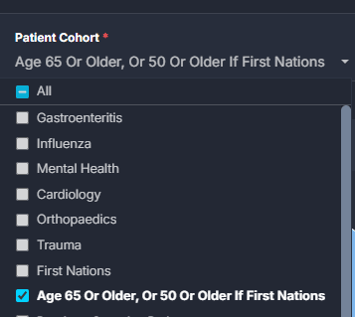
Where to find it: Patient Cohorts
Learn more: Patient Cohorts guides on the Knowledge Base
More accurate Emergency Department occupancy and flow measures
Two corrections improve the accuracy of Emergency Department measures.
In PodView, excluded non-patient locations are now consistently removed from available-bed and occupancy calculations. If your site excludes a higher proportion of locations, you may see lower available-bed counts and slightly higher occupancy percentages from this release. The new figures are the more accurate reflection of your department.
In Flow Monitor, the Waiting for Observation Area measure now correctly counts patients with an observation request, using the current Awaiting Ward Allocation logic. Active patients also now stay visible in Live Patient Flow while their location records are being updated. Historical views were not affected.
Where to find it: Emergency Department > Department Now > PodView, and Emergency Department > Flow Monitor
Outpatients referral reporting refined
The Uncategorised Referrals Top 20 Specialties chart now responds to the selected Referral Status, matching the behaviour of the other charts and lists on the page. Availability depends on your deployment.
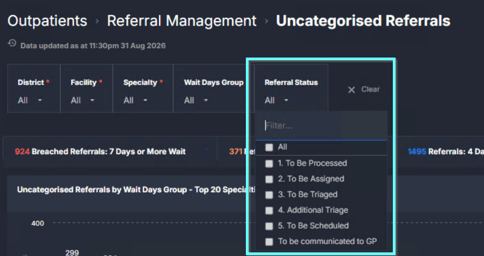
Where to find it: Outpatients > Referral Management > Uncategorised Referrals
More control over your MyHub and MyList columns
Column changes now save against the specific tile in MyHub or MyList, so adjusting one list no longer changes every other instance of it. When you view a shared MyHub or MyList, you see the owner’s column configuration exactly as they set it. Tiles also resize to fit your MyHub layout, so content stays clear without adjusting your browser zoom.
Where to find it: Applications > Interact > MyHub and MyList
Learn more: Interact guides on the Knowledge Base
Fixes in this release
|
Area |
What's fixed |
|
Surgery > Waiting List > Patient List |
Adding the Anaesthetic Type column to a customised MyList no longer affects other column selections. |
|
Outpatients > Reviews > High-Frequency Review Patients |
Excel exports now include the full dataset and are no longer capped at 100 rows. |
|
Beds > Complex Patients > Discharged Patient Register |
Care Type values now display cleanly, without a leading numeric prefix, matching the Care Type filter options. |
|
Beds > Complex Patients > Escalation List |
The list subtitle now shows the selected Order By value, so it is easier to confirm how the list is sorted. |
Did you know?
You can add Anaesthetic Type as a column on the Elective Surgery Waiting List, so you can view this detail alongside other patient information in the list. When exporting to MyLists, XLS or CSV, select Anaesthetic Type early in your column selection to position it near the front of the exported file.
Exporting a large dataset, such as a statewide waiting list? Exporting directly from Explore can take longer. Build a MyList and export it from Interact instead; it is typically ready in seconds rather than minutes.
Keep learning
Learning Hub: Walkthroughs, domain overviews and guided resources.
Webinars: Live sessions and on-demand recordings on key features and domains.
Questions or feedback? Contact us at customersuccess@healthcarelogic.com.