---
title: Historic Breach Analysis
description: Analyse Emergency Department breach trends over time by arrival and breach date. Identify when patients exceed PET KPIs, compare performance, and explore triage and journey stage impacts.
---
[Skip to content](https://academy.healthcarelogic.com/knowledge/historic-breach-analysis#main-content)
[Contact Us](https://academy.healthcarelogic.com/knowledge/kb-tickets/new)
[](https://academy.healthcarelogic.com/knowledge)
- [Getting Started](https://academy.healthcarelogic.com/getting-started-with-systemview)
- [Domain Overviews](https://academy.healthcarelogic.com/learning-hub/domain-overviews)
- [On-demand Learning](https://academy.healthcarelogic.com/learning-hub/webinars/australia/on-demand-webinars)
- [Webinars](https://academy.healthcarelogic.com/learning-hub/webinars)
Open main navigation
Close main navigation
- [Getting Started](https://academy.healthcarelogic.com/getting-started-with-systemview)
- [Domain Overviews](https://academy.healthcarelogic.com/learning-hub/domain-overviews)
- [On-demand Learning](https://academy.healthcarelogic.com/learning-hub/webinars/australia/on-demand-webinars)
- [Webinars](https://academy.healthcarelogic.com/learning-hub/webinars)
- [Contact Us](https://academy.healthcarelogic.com/knowledge/kb-tickets/new)
- [Contact Us](https://info.healthcarelogic.com/contact-us)
[Contact Us](https://info.healthcarelogic.com/contact-us)
Search the Knowledge Base
- There are no suggestions because the search field is empty.
1. [SystemView Knowledge Base](https://academy.healthcarelogic.com/knowledge)
2. [Emergency Department](https://academy.healthcarelogic.com/knowledge/emergency-department)
3. [Performance Trends & Analytics](https://academy.healthcarelogic.com/knowledge/emergency-department#performance-trends-analytics)
May 1, 2026
# Historic Breach Analysis
## Understand when and where ED access target breaches occur over time to identify patterns and performance gaps.
#### **Location in SystemView:** Emergency Department \> Historic Breach Analysis
**In this article**
- [What it is](https://academy.healthcarelogic.com/knowledge/historic-breach-analysis#What-it-is)
- [Why it matters](https://academy.healthcarelogic.com/knowledge/historic-breach-analysis#Why-it-matters)
- [How to use it](https://academy.healthcarelogic.com/knowledge/historic-breach-analysis#How-to-use-it)
- [How it works](https://academy.healthcarelogic.com/knowledge/historic-breach-analysis#How-it-works)
- [How it helps you](https://academy.healthcarelogic.com/knowledge/historic-breach-analysis#How-it-helps-you)
- [Best practices](https://academy.healthcarelogic.com/knowledge/historic-breach-analysis#Best-practices)
---
### **What it is**
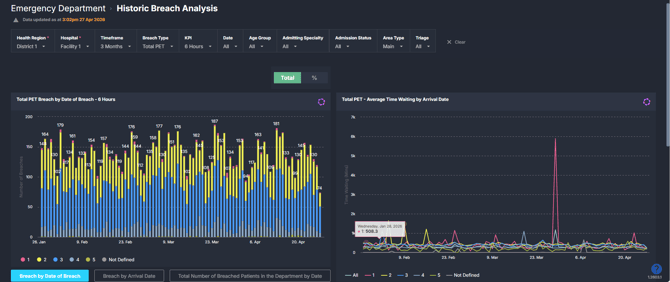
The Historic Breach Analysis component shows Emergency Department (ED) performance against time-based access targets over a selected historical period. It focuses on when breaches occur, how frequently they happen, and how performance trends over time.
It provides both **volume (number of breaches)** and **performance (% achieved within KPI)** views, with the ability to analyse results by arrival date, breach date, triage category, and stage of the ED journey.
---
### **Why it matters**
##### *Identify patterns in ED breaches to better understand performance over time.*
This component helps teams move beyond real-time monitoring to understand historical trends and recurring pressure points.
- Track how often ED patients exceed the selected KPI (for example, 6-hour PET).
- Compare performance by **arrival date versus breach date** to understand flow dynamics.
- Identify which **triage categories or patient groups** are most impacted.
- Support retrospective review, reporting, and service planning.
---
### **How to use it**
#### **Filter to focus your view**
Use the filter bar to refine the analysis:
- **Health Region / Hospital**: Select the organisation or facility to analyse.
- **Timeframe**: Define the historical period (for example, last 3 months).
- **Breach Type**: Choose the stage of the ED journey to analyse against KPI:
- Total PET
- Waiting for Triage
- Waiting to be Seen
- **KPI**: Select the time threshold (for example, 6 hours). This defines what constitutes a breach.
- **Date**: Filter to specific dates if required.
- **Age Group**: Focus on Adult, Paediatric, Aged 75+, or all patients.
- **Admitting Specialty**: Filter by specialty where relevant.
- **Admission Status**: View admitted, non-admitted, or all patients.
- **Area Type**: Filter by ED area (for example, Main or other configured areas).
- **Triage**: Analyse specific triage categories (1–5).
#### **Explore breach trends**
Use the toggle buttons within charts to switch between:
- **Date of Breach**: When the KPI was exceeded
- **Arrival Date**: When the patient presented to ED
This allows comparison between **when demand entered the system** and **when breaches occurred**.
#### **Explore breach trends and performance**
| Tile / Chart Name | What it shows |
| --- | --- |
| Total PET Breach by Date of Breach | Daily count of patients in ED who exceeded the selected KPI, grouped by the date the breach occurred. Includes breakdown by triage category. |
| % Achieved by Date of Breach | Percentage of patients who met the KPI on each day, based on breach date. Calculated as the proportion of patients within the KPI. |
| Total PET Breach by Arrival Date | Daily count of patients who breached the KPI, grouped by their ED arrival date. Helps link breaches back to demand patterns. |
| % Achieved by Arrival Date | Percentage of patients meeting the KPI, grouped by arrival date. Useful for understanding performance relative to incoming demand. |
| Total Number of Breached Patients in the Department by Date | Total number of patients present in ED on each date who exceeded the KPI, regardless of when they arrived. |
| % Achieved Patients in the Department by Date | Percentage of all patients in ED on a given date who met the KPI. Reflects overall department performance on that day. |
| Total PET – Average Time Waiting by Arrival Date | Average total ED length of stay (LoS) for patients, grouped by arrival date and triage category. Highlights variation in patient experience over time. |
| Total PET Patient Journey ED Pathway Duration | Patient-level table showing timestamps across the ED journey (arrival, triage, first seen, bed request, etc.), along with wait times and triage category. |
---
### **How it works**
This component uses historical ED presentation and patient journey data to analyse performance against a selected time-based KPI.
- A **breach** occurs when a patient’s time in ED exceeds the selected KPI threshold (for example, 6-hour PET).
- The **KPI filter** determines the threshold applied across all charts.
- **Breach Type** defines which part of the ED journey is being measured against the KPI (for example, total ED length of stay or specific wait stages).
- Data can be grouped by either:
- **Arrival Date** (when the patient presented), or
- **Date of Breach** (when the KPI threshold was exceeded).
Data is refreshed regularly from source systems and reflects recorded ED events and timestamps.
---
### **How it helps you**
- **Identify recurring pressure periods**: Understand which days or periods consistently show higher breach volumes.
- **Link demand to performance**: Compare arrival-based and breach-based views to identify delayed effects of demand.
- **Understand cohort impact**: Analyse which triage categories or patient groups are most affected by delays.
- **Support performance reporting**: Use % achieved metrics to track access target compliance over time.
- **Investigate individual journeys**: Drill into patient-level data to understand where delays occur.
---
### **Best practices**
#### **How often should I use it?**
| What to do | How often | Who typically does this | Why it helps |
| --- | --- | --- | --- |
| Review breach trends over recent weeks | **Weekly** | ED Operations Manager / Flow Coordinator | Identifies emerging patterns and recurring pressure points |
| Compare arrival vs breach date views | **Weekly** | ED Leadership / Performance Analysts | Helps distinguish demand-driven vs process-driven delays |
| Analyse triage category performance | **Fortnightly** | ED Clinical Leads | Highlights which patient groups are most impacted |
| Investigate specific high-breach days | **As needed** | ED Analysts / Operations צוות | Supports root cause analysis and review |
#### **Pair with these components**
- **🔗** [**Department Now \> Live Breach Analysis**](https://academy.healthcarelogic.com/knowledge/ed-department-now-live-breach-analysis)
Use for real-time monitoring of current breaches and at-risk patients.
- **🔗** [**PET Analysis**](https://academy.healthcarelogic.com/knowledge/ed-neat-elos-pet-analysis)
Use for broader performance trends and comparison across admitted vs non-admitted cohorts.
#### **Tips for success**
- Use **Arrival Date and Date of Breach together** to understand how demand translates into downstream pressure.
- Start with **Total PET**, then refine to specific **wait stages** to isolate where delays occur.
- Review both **counts and percentages** to balance volume and performance perspectives.
- Use the **patient-level table** to validate trends and investigate outliers.
- Be aware that **filters significantly affect interpretation**, particularly KPI and Breach Type.
- [Getting Started](https://academy.healthcarelogic.com/knowledge/getting-started#main-content)
- [Welcome & Introduction](https://academy.healthcarelogic.com/knowledge/getting-started#welcome-introduction)
- [Access & Account Setup](https://academy.healthcarelogic.com/knowledge/getting-started#access-account-setup)
- [Basic Navigation & Layout](https://academy.healthcarelogic.com/knowledge/getting-started#basic-navigation-layout)
- [FAQs & Troubleshooting](https://academy.healthcarelogic.com/knowledge/getting-started#faqs-troubleshooting)
- [Interact](https://academy.healthcarelogic.com/knowledge/interact#main-content)
- [Interact Basics](https://academy.healthcarelogic.com/knowledge/interact#interact-basics)
- [Customising SystemView](https://academy.healthcarelogic.com/knowledge/interact#customising-systemview)
- [Sharing & Duplicating Content](https://academy.healthcarelogic.com/knowledge/interact#sharing-duplicating-content)
- [Using Notifications & Improvement Tools](https://academy.healthcarelogic.com/knowledge/interact#using-notifications-improvement-tools)
- [Surgery](https://academy.healthcarelogic.com/knowledge/surgery#main-content)
- [Introduction & Terminology](https://academy.healthcarelogic.com/knowledge/surgery#introduction-terminology)
- [Waiting List Management](https://academy.healthcarelogic.com/knowledge/surgery#waiting-list-management)
- [Scheduling & Booking Management](https://academy.healthcarelogic.com/knowledge/surgery#scheduling-booking-management)
- [Performance & Activity Analysis](https://academy.healthcarelogic.com/knowledge/surgery#performance-activity-analysis)
- [Emergency Surgery](https://academy.healthcarelogic.com/knowledge/surgery#emergency-surgery)
- [FAQs & Troubleshooting](https://academy.healthcarelogic.com/knowledge/surgery#faqs-troubleshooting)
- [Outpatients](https://academy.healthcarelogic.com/knowledge/outpatients#main-content)
- [Introduction & Terminology](https://academy.healthcarelogic.com/knowledge/outpatients#introduction-terminology)
- [Waiting List Management](https://academy.healthcarelogic.com/knowledge/outpatients#waiting-list-management)
- [Referral Management](https://academy.healthcarelogic.com/knowledge/outpatients#referral-management)
- [Wait Times](https://academy.healthcarelogic.com/knowledge/outpatients#wait-times)
- [Demand & Capacity Planning](https://academy.healthcarelogic.com/knowledge/outpatients#demand-capacity-planning)
- [Bookings & Reviews](https://academy.healthcarelogic.com/knowledge/outpatients#bookings-reviews)
- [Clinic Effectiveness & Appointment Outcomes](https://academy.healthcarelogic.com/knowledge/outpatients#clinic-effectiveness-appointment-outcomes)
- [Virtual Learning & Tools](https://academy.healthcarelogic.com/knowledge/outpatients#virtual-learning-tools)
- [Beds](https://academy.healthcarelogic.com/knowledge/beds#main-content)
- [Introduction & Foundations](https://academy.healthcarelogic.com/knowledge/beds#introduction-foundations)
- [Inpatient Demand & Capacity](https://academy.healthcarelogic.com/knowledge/beds#inpatient-demand-capacity)
- [Complex Patients Management](https://academy.healthcarelogic.com/knowledge/beds#complex-patients-management)
- [Risk of Hospitalisation & Readmissions](https://academy.healthcarelogic.com/knowledge/beds#risk-of-hospitalisation-readmissions)
- [Length of Stay & Inpatient Flow](https://academy.healthcarelogic.com/knowledge/beds#length-of-stay-inpatient-flow)
- [Inpatient Occupancy Forecaster](https://academy.healthcarelogic.com/knowledge/beds#inpatient-occupancy-forecaster)
- [Emergency Department](https://academy.healthcarelogic.com/knowledge/emergency-department#main-content)
- [Introduction & Foundations](https://academy.healthcarelogic.com/knowledge/emergency-department#introduction-foundations)
- [Department Now](https://academy.healthcarelogic.com/knowledge/emergency-department#department-now)
- [Flow Monitor](https://academy.healthcarelogic.com/knowledge/emergency-department#flow-monitor)
- [Performance Trends & Analytics](https://academy.healthcarelogic.com/knowledge/emergency-department#performance-trends-analytics)
- [Virtual Learning & Tools](https://academy.healthcarelogic.com/knowledge/emergency-department#virtual-learning-tools)
- [FAQs & Troubleshooting](https://academy.healthcarelogic.com/knowledge/emergency-department#faqs-troubleshooting)
- [SystemView 2](https://academy.healthcarelogic.com/knowledge/systemview-2)
- [System Administration](https://academy.healthcarelogic.com/knowledge/system-administration)
- [Patient Cohorts](https://academy.healthcarelogic.com/knowledge/patient-cohorts#main-content)
- [Beds](https://academy.healthcarelogic.com/knowledge/patient-cohorts#beds)
- [Emergency Department](https://academy.healthcarelogic.com/knowledge/patient-cohorts#emergency-department)
- [Release Notes](https://academy.healthcarelogic.com/knowledge/release-notes)
[](https://healthcarelogic.com/)
[mailto:customersuccess@healthcarelogic.com](mailto:customersuccess@healthcarelogic.com)
© 2026 HealthCare Logic. All rights reserved
**Didn't find what you were looking for?**
[Raise a support ticket](https://academy.healthcarelogic.com/knowledge/kb-tickets/new) and our team will come back to you. For guided training try the [Learning Hub](https://academy.healthcarelogic.com/learning-hub), or catch up on a [past webinar](https://academy.healthcarelogic.com/learning-hub/webinars).