---
title: Referral Management > Uncategorised Referrals
description: Monitor uncategorised outpatient referrals, identify delays in triage, and track backlog by wait time and specialty.
---
[Skip to content](https://academy.healthcarelogic.com/knowledge/outpatients-uncategorised-referrals-1#main-content)
[Contact Us](https://academy.healthcarelogic.com/knowledge/kb-tickets/new)
[](https://academy.healthcarelogic.com/knowledge)
- [Getting Started](https://academy.healthcarelogic.com/getting-started-with-systemview)
- [Domain Overviews](https://academy.healthcarelogic.com/learning-hub/domain-overviews)
- [On-demand Learning](https://academy.healthcarelogic.com/learning-hub/webinars/australia/on-demand-webinars)
- [Webinars](https://academy.healthcarelogic.com/learning-hub/webinars)
Open main navigation
Close main navigation
- [Getting Started](https://academy.healthcarelogic.com/getting-started-with-systemview)
- [Domain Overviews](https://academy.healthcarelogic.com/learning-hub/domain-overviews)
- [On-demand Learning](https://academy.healthcarelogic.com/learning-hub/webinars/australia/on-demand-webinars)
- [Webinars](https://academy.healthcarelogic.com/learning-hub/webinars)
- [Contact Us](https://academy.healthcarelogic.com/knowledge/kb-tickets/new)
- [Contact Us](https://info.healthcarelogic.com/contact-us)
[Contact Us](https://info.healthcarelogic.com/contact-us)
Search the Knowledge Base
- There are no suggestions because the search field is empty.
1. [SystemView Knowledge Base](https://academy.healthcarelogic.com/knowledge)
2. [Outpatients](https://academy.healthcarelogic.com/knowledge/outpatients)
3. [Referral Management](https://academy.healthcarelogic.com/knowledge/outpatients#referral-management)
April 24, 2026
# Referral Management \> Uncategorised Referrals
## Gain visibility into referrals that have not yet been categorised and identify where delays are building.
#### **Location in SystemView:** Explore \> Outpatients \> Uncategorised Referrals
ℹ️ **Note:** Depending on your SystemView environment, this component may appear under:
**Outpatients \> Uncategorised Referrals**
or
**Outpatients \> Referral Management \> Uncategorised Referrals**
**In this article:**
- [What it is](https://academy.healthcarelogic.com/knowledge/outpatients-uncategorised-referrals-1#what-it-is)
- [Why it matters](https://academy.healthcarelogic.com/knowledge/outpatients-uncategorised-referrals-1#Why-it-matters)
- [How to use it](https://academy.healthcarelogic.com/knowledge/outpatients-uncategorised-referrals-1#How-to-use-it)
- [How it works](https://academy.healthcarelogic.com/knowledge/outpatients-uncategorised-referrals-1#How-it-works)
- [How it helps you](https://academy.healthcarelogic.com/knowledge/outpatients-uncategorised-referrals-1#How-it-helps-you)
- [Best practices](https://academy.healthcarelogic.com/knowledge/outpatients-uncategorised-referrals-1#Best-practices)
- [FAQs](https://academy.healthcarelogic.com/knowledge/outpatients-uncategorised-referrals-1#FAQs)
---
### **What it is**
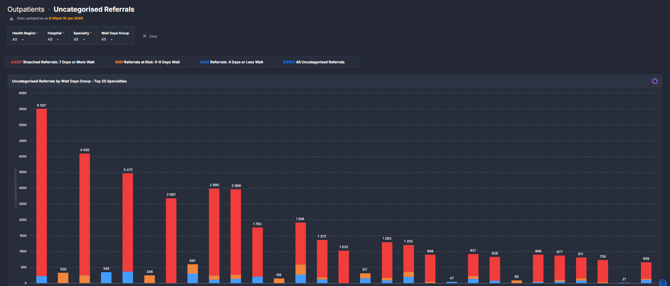
The Uncategorised Referrals component shows referrals that have not yet been assigned a clinical category. It groups these referrals by how long they have been waiting and highlights those approaching or exceeding expected timeframes.
This component supports monitoring of referral processing performance and helps identify backlogs across specialties and services.
---
### **Why it matters**
##### *Delays in categorising referrals can impact timely access to care.*
Uncategorised referrals represent patients who have entered the system but are not yet clinically prioritised. Monitoring these delays helps teams maintain timely triage processes and reduce downstream waiting list pressure.
- Identify referrals that are at risk of delay or already outside expected timeframes
- Highlight specialties or services with the largest categorisation backlog
- Monitor distribution of wait times to understand pressure points
- Support timely referral processing and improved patient flow through outpatient services
---
### **How to use it**
#### **Filter to focus your view**
Use the filter bar to refine which referrals are displayed:
- **Health Region**: Filter by region or network
- **Hospital**: Focus on a specific facility
- **Specialty**: View referrals for a selected outpatient specialty
- **Wait Days Group**: Segment referrals by wait time:
- 4 days or less
- At Risk (5–6 days)
- Breached (7 days or more)
- **Referral Status**: Filter by stage in the categorisation or triage process
---
#### **Explore uncategorised referral delays**
| Tile / Chart Name | What it shows |
| --- | --- |
| Uncategorised Referrals (summary tiles) | High-level counts of all uncategorised referrals, including those within 4 days, at risk (5–6 days), and breached (7+ days). |
| Uncategorised Referrals by Wait Days Group | Distribution of all uncategorised referrals grouped by wait time categories. |
| Uncategorised Referrals Distribution by Wait Days Group | Detailed spread of referrals by individual wait days, showing how long patients have been waiting before categorisation. |
| Uncategorised Referrals by Wait Days Group – Top 20 Specialties | Breakdown of uncategorised referrals by wait group across the top 20 specialties with the highest volumes. Selecting a specialty filters the component. |
---
### **How it works**
SystemView retrieves referral data from the source system and identifies those that have not yet been assigned a clinical category.
Referrals are grouped based on the number of days since receipt:
- 4 days or less
- 5–6 days (at risk)
- 7 days or more (breached)
The component updates after each data refresh cycle and reflects the current state of uncategorised referrals at the time of the last update.
Selecting elements within charts dynamically filters the rest of the component, allowing users to move from a high-level overview to specialty-level detail.
---
### **How it helps you**
- **Monitor referral processing performance:** Track how quickly referrals are being categorised across services
- **Identify emerging backlogs:** Detect increases in at-risk or breached referrals early
- **Focus on high-pressure specialties:** Understand where delays are concentrated
- **Support operational oversight:** Provide visibility for managing outpatient intake and triage workflows
- **Enable proactive follow-up:** Highlight referrals requiring attention before delays increase
---
### **Best practices**
#### **How often should I use it?**
| What to do | How often | Who typically does this | Why it helps |
| --- | --- | --- | --- |
| Review total uncategorised referrals and wait group split | **Daily** | Outpatient service managers, clinic coordinators | Maintains visibility of referral processing workload |
| Monitor at-risk and breached referrals | **Daily** | Operational leads, administrative teams | Helps prioritise referrals nearing or exceeding expected timeframes |
| Analyse specialty-level backlog | **Weekly** | Service managers, access coordinators | Identifies services requiring additional focus or support |
| Track trends in wait time distribution | **Weekly** | Executive and strategic stakeholders | Supports planning and performance monitoring |
#### **Pair with these components**
- **🔗**[**Waiting List \> Trends:**](https://academy.healthcarelogic.com/knowledge/outpatients-waiting-list-trends-0)Compare uncategorised referral delays with overall waiting list performance and long waits
- **🔗** [**Waiting List \> Patient List:**](https://academy.healthcarelogic.com/knowledge/surgery-waiting-list-patient-list)Drill down to patient-level detail for follow-up and validation
#### **Tips for success**
- Focus on the **at risk and breached groups** to prioritise action
- Use the **specialty breakdown** to target areas with the greatest delays
- Apply filters to isolate specific facilities or services before drawing conclusions
- Combine with patient-level views to support follow-up and data validation
- Be aware that categorisation timing reflects source system processes and data quality
---
### **FAQs**
**Q. Why are there a high number of uncategorised referrals?**
A. This typically reflects delays in the categorisation or triage process within the source system. SystemView displays the current state of referrals as recorded, without modifying or reclassifying them.
**Q. What does “breached” mean in this component?**
A. Breached refers to referrals that have not been categorised within 7 days of receipt. This threshold may reflect local expectations for timely triage.
**Q. Can I see referrals outside the top 20 specialties?**
A. Yes. Use the Specialty filter in the filter bar to view any specialty, even if it is not shown in the Top 20 chart.
- [Getting Started](https://academy.healthcarelogic.com/knowledge/getting-started#main-content)
- [Welcome & Introduction](https://academy.healthcarelogic.com/knowledge/getting-started#welcome-introduction)
- [Access & Account Setup](https://academy.healthcarelogic.com/knowledge/getting-started#access-account-setup)
- [Basic Navigation & Layout](https://academy.healthcarelogic.com/knowledge/getting-started#basic-navigation-layout)
- [FAQs & Troubleshooting](https://academy.healthcarelogic.com/knowledge/getting-started#faqs-troubleshooting)
- [Interact](https://academy.healthcarelogic.com/knowledge/interact#main-content)
- [Interact Basics](https://academy.healthcarelogic.com/knowledge/interact#interact-basics)
- [Customising SystemView](https://academy.healthcarelogic.com/knowledge/interact#customising-systemview)
- [Sharing & Duplicating Content](https://academy.healthcarelogic.com/knowledge/interact#sharing-duplicating-content)
- [Using Notifications & Improvement Tools](https://academy.healthcarelogic.com/knowledge/interact#using-notifications-improvement-tools)
- [Surgery](https://academy.healthcarelogic.com/knowledge/surgery#main-content)
- [Introduction & Terminology](https://academy.healthcarelogic.com/knowledge/surgery#introduction-terminology)
- [Waiting List Management](https://academy.healthcarelogic.com/knowledge/surgery#waiting-list-management)
- [Scheduling & Booking Management](https://academy.healthcarelogic.com/knowledge/surgery#scheduling-booking-management)
- [Performance & Activity Analysis](https://academy.healthcarelogic.com/knowledge/surgery#performance-activity-analysis)
- [Emergency Surgery](https://academy.healthcarelogic.com/knowledge/surgery#emergency-surgery)
- [FAQs & Troubleshooting](https://academy.healthcarelogic.com/knowledge/surgery#faqs-troubleshooting)
- [Outpatients](https://academy.healthcarelogic.com/knowledge/outpatients#main-content)
- [Introduction & Terminology](https://academy.healthcarelogic.com/knowledge/outpatients#introduction-terminology)
- [Waiting List Management](https://academy.healthcarelogic.com/knowledge/outpatients#waiting-list-management)
- [Referral Management](https://academy.healthcarelogic.com/knowledge/outpatients#referral-management)
- [Wait Times](https://academy.healthcarelogic.com/knowledge/outpatients#wait-times)
- [Demand & Capacity Planning](https://academy.healthcarelogic.com/knowledge/outpatients#demand-capacity-planning)
- [Bookings & Reviews](https://academy.healthcarelogic.com/knowledge/outpatients#bookings-reviews)
- [Clinic Effectiveness & Appointment Outcomes](https://academy.healthcarelogic.com/knowledge/outpatients#clinic-effectiveness-appointment-outcomes)
- [Virtual Learning & Tools](https://academy.healthcarelogic.com/knowledge/outpatients#virtual-learning-tools)
- [Beds](https://academy.healthcarelogic.com/knowledge/beds#main-content)
- [Introduction & Foundations](https://academy.healthcarelogic.com/knowledge/beds#introduction-foundations)
- [Inpatient Demand & Capacity](https://academy.healthcarelogic.com/knowledge/beds#inpatient-demand-capacity)
- [Complex Patients Management](https://academy.healthcarelogic.com/knowledge/beds#complex-patients-management)
- [Risk of Hospitalisation & Readmissions](https://academy.healthcarelogic.com/knowledge/beds#risk-of-hospitalisation-readmissions)
- [Length of Stay & Inpatient Flow](https://academy.healthcarelogic.com/knowledge/beds#length-of-stay-inpatient-flow)
- [Inpatient Occupancy Forecaster](https://academy.healthcarelogic.com/knowledge/beds#inpatient-occupancy-forecaster)
- [Emergency Department](https://academy.healthcarelogic.com/knowledge/emergency-department#main-content)
- [Introduction & Foundations](https://academy.healthcarelogic.com/knowledge/emergency-department#introduction-foundations)
- [Department Now](https://academy.healthcarelogic.com/knowledge/emergency-department#department-now)
- [Flow Monitor](https://academy.healthcarelogic.com/knowledge/emergency-department#flow-monitor)
- [Performance Trends & Analytics](https://academy.healthcarelogic.com/knowledge/emergency-department#performance-trends-analytics)
- [Virtual Learning & Tools](https://academy.healthcarelogic.com/knowledge/emergency-department#virtual-learning-tools)
- [FAQs & Troubleshooting](https://academy.healthcarelogic.com/knowledge/emergency-department#faqs-troubleshooting)
- [SystemView 2](https://academy.healthcarelogic.com/knowledge/systemview-2)
- [System Administration](https://academy.healthcarelogic.com/knowledge/system-administration)
- [Patient Cohorts](https://academy.healthcarelogic.com/knowledge/patient-cohorts#main-content)
- [Beds](https://academy.healthcarelogic.com/knowledge/patient-cohorts#beds)
- [Emergency Department](https://academy.healthcarelogic.com/knowledge/patient-cohorts#emergency-department)
- [Release Notes](https://academy.healthcarelogic.com/knowledge/release-notes)
[](https://healthcarelogic.com/)
[mailto:customersuccess@healthcarelogic.com](mailto:customersuccess@healthcarelogic.com)
© 2026 HealthCare Logic. All rights reserved
**Didn't find what you were looking for?**
[Raise a support ticket](https://academy.healthcarelogic.com/knowledge/kb-tickets/new) and our team will come back to you. For guided training try the [Learning Hub](https://academy.healthcarelogic.com/learning-hub), or catch up on a [past webinar](https://academy.healthcarelogic.com/learning-hub/webinars).