---
title: Understanding and using the Current Bed Status table in System Overview
description: Understand each column in the Current Bed Status table in System Overview and how operational inputs affect ward-level bed balance.
---
[Skip to content](https://academy.healthcarelogic.com/knowledge/understanding-and-using-the-current-bed-status-table-in-system-overview#main-content)
[Contact Us](https://academy.healthcarelogic.com/knowledge/kb-tickets/new)
[](https://academy.healthcarelogic.com/knowledge)
- [Getting Started](https://academy.healthcarelogic.com/getting-started-with-systemview)
- [Domain Overviews](https://academy.healthcarelogic.com/learning-hub/domain-overviews)
- [On-demand Learning](https://academy.healthcarelogic.com/learning-hub/webinars/australia/on-demand-webinars)
- [Webinars](https://academy.healthcarelogic.com/learning-hub/webinars)
Open main navigation
Close main navigation
- [Getting Started](https://academy.healthcarelogic.com/getting-started-with-systemview)
- [Domain Overviews](https://academy.healthcarelogic.com/learning-hub/domain-overviews)
- [On-demand Learning](https://academy.healthcarelogic.com/learning-hub/webinars/australia/on-demand-webinars)
- [Webinars](https://academy.healthcarelogic.com/learning-hub/webinars)
- [Contact Us](https://academy.healthcarelogic.com/knowledge/kb-tickets/new)
- [Contact Us](https://info.healthcarelogic.com/contact-us)
[Contact Us](https://info.healthcarelogic.com/contact-us)
Search the Knowledge Base
- There are no suggestions because the search field is empty.
1. [SystemView Knowledge Base](https://academy.healthcarelogic.com/knowledge)
2. [Beds](https://academy.healthcarelogic.com/knowledge/beds)
3. [Inpatient Demand & Capacity](https://academy.healthcarelogic.com/knowledge/beds#inpatient-demand-capacity)
December 18, 2025
# Understanding and using the Current Bed Status table in System Overview
## Understand what each column in the Current Bed Status table means and how to use it to support day-to-day inpatient flow decisions.
The Current Bed Status table in [System Overview ›](https://academy.healthcarelogic.com/knowledge/beds-inpatient-demand-system-overview) provides a ward-level view of inpatient demand, capacity, and expected changes across the hospital. It combines live data from hospital source systems with optional user inputs, allowing operational teams to reflect both confirmed and expected activity when managing patient flow.
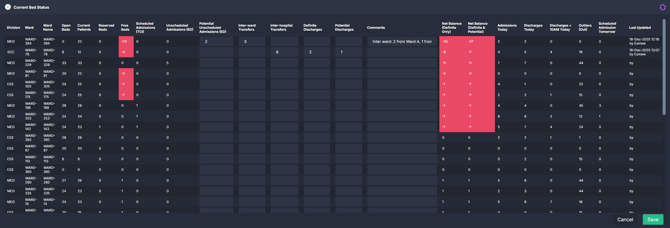
This article explains what each column means, how key values are calculated, and how the table is commonly used in practice.
**In this article:**
- [What the table shows](https://academy.healthcarelogic.com/knowledge/understanding-and-using-the-current-bed-status-table-in-system-overview#what-the-table-shows)
- [Source-system columns](https://academy.healthcarelogic.com/knowledge/understanding-and-using-the-current-bed-status-table-in-system-overview#source-system-columns)
- [User-input fields](https://academy.healthcarelogic.com/knowledge/understanding-and-using-the-current-bed-status-table-in-system-overview#user-input-fields)
- [Saving and tracking user inputs](https://academy.healthcarelogic.com/knowledge/understanding-and-using-the-current-bed-status-table-in-system-overview#saving-and-tracking-user-inputs)
- [Calculated columns](https://academy.healthcarelogic.com/knowledge/understanding-and-using-the-current-bed-status-table-in-system-overview#calculated-columns)
- [Using the table in practice](https://academy.healthcarelogic.com/knowledge/understanding-and-using-the-current-bed-status-table-in-system-overview#using-in-practice)
- [Key points](https://academy.healthcarelogic.com/knowledge/understanding-and-using-the-current-bed-status-table-in-system-overview#key-points)
---
### **What the Current Bed Status table shows**
The Current Bed Status table is **aggregated from the underlying hospital source system in near real time for each ward**. It updates dynamically when:
- Filters are changed
- Source system data refreshes
- User inputs are added or updated
In addition to confirmed data, the table allows user input to account for **expected admissions, transfers, and discharges** that may not yet be captured in source systems. This makes it a practical, operational tool that adapts to real-time conditions without altering official records.
---
### **Source-system columns (read-only)**
The following columns reflect the **current confirmed bed status for each ward**, based on the latest available data from hospital source systems. Together, they describe the ward’s baseline capacity, occupancy, and confirmed patient activity before any expected or potential changes are applied.
| **Column** | **What it shows** |
| --- | --- |
| **Open Beds** | The total number of open and operating beds in the ward or inpatient location. This represents the ward’s current bed capacity. |
| **Current Patients** | The total number of inpatients currently admitted to the ward. |
| **Reserved Beds** | The number of beds reserved for a specific purpose or patient group. Reserved beds are not available for general admission and typically include special purpose beds such as paediatric, maternity, ICU, or mental health beds. |
| **Free Beds** | The number of beds currently available for inpatient admission on the ward, based on confirmed capacity (open beds) and occupancy (current patients). |
| **Scheduled Admissions (TCI)** | The number of patients scheduled to be admitted to the ward today via planned care pathways such as elective surgery. These patients have a planned arrival ward or post-surgery ward that matches the ward's code. |
| **Unscheduled Admissions (ED)** | The number of patients in the Emergency Department with an active bed request to be admitted to the ward. |
| **Admissions Today** | The total number of admissions that have already occurred in the ward so far today. |
| **Discharges Today** | The total number of discharges from the ward or hospital that have already occurred today. |
| **Discharges \< 10AM Today** | The number of discharges that occurred before 10 am today, supporting monitoring of early discharge activity. |
| **Outliers (Out)** | The number of patients under the care of the ward’s specialty who are currently admitted to a different ward. These patients are not physically located on the ward but indicate specialty-related demand elsewhere in the hospital. |
| **Scheduled Admissions Tomorrow** | The number of patients scheduled to be admitted to the ward tomorrow via planned care pathways such as elective surgery. |
**💡 Tip:** Open bed numbers are maintained by users in the**[Bed Capacity Monitor ›](https://academy.healthcarelogic.com/knowledge/beds-bed-capacity-monitor)**. This allows operational teams to adjust ward capacity to reflect staffing, closures, or temporary changes, which then flow through to the **Current Bed Status** table.
---
### **User-input fields (operational inputs)**
The following fields allow users to temporarily capture **expected changes** that are known operationally but not yet reflected in source systems.
| **Input field** | **Description** | **Example use** |
| --- | --- | --- |
| **Potential Unscheduled Admissions (ED)** | Patients expected to arrive on the ward from ED but not yet allocated a specific bed in the source system. These are known pending admissions that have not yet appeared in the Unscheduled Admissions (ED) column. | The ED team confirms two patients will be admitted to Ward A, but beds are not yet allocated. Enter **2** for Ward A. |
| **Inter-ward transfers** | The number of patients known to transfer into the ward from other wards within the same hospital. | Ward A is expecting 2 patients from Ward B and 1 from Ward C. Enter **3**. |
| **Inter-hospital transfers** | The number of patients known to transfer into the ward from other hospitals. | Hospital 1, Ward A is expecting 4 patients from Hospital 2 and 2 from Hospital 3. Enter **6**. |
| **Definite discharges** | Patients confirmed to leave the ward today, with all required conditions met. These discharges are expected to occur. | Three patients are confirmed to go home and one to transfer to another ward. Enter **4**. |
| **Potential discharges** | Patients planned to leave the ward today but not yet confirmed. These depend on pending clinical, operational, or social factors. | Two patients may be discharged later today if reviews are completed. Enter **2**. |
| **Comments** | Free-text notes to record assumptions, context, or breakdowns related to user inputs. | “2 inter-ward transfers from Ward B, 1 from Ward C. Awaiting transport.” |
| **Last updated** | Displays the user ID and timestamp of the most recent update to that ward’s user input fields. | Used to confirm when values were last reviewed. |
ℹ️ **Important note:** User-inputted values in the Current Bed Status table are cleared at the end of each day.
#### **Saving and tracking user inputs**
After entering or updating values in the user-input fields, select **Save** in the bottom right-hand corner of the Current Bed Status table.
Saving updates:
- The **net balance columns** for each ward in the table
- The **summary tiles above** the table that reflect definite and potential bed balance
Each saved change is recorded in the **Last updated** field, showing the user ID and timestamp of the most recent update.
All saved inputs are also captured in the **Change Log**, which can be accessed via the **Change Log** button next to the filter bar at the top. The Change Log displays a rolling **7-day history** of user inputs, allowing teams to review recent changes and maintain continuity across shifts.
---
### **Calculated columns**
The table also includes **ward-level calculated fields** that bring together confirmed source-system data and user-entered operational inputs.
These calculated columns help teams move beyond a static view of capacity and understand:
- Whether a ward is currently balanced or under pressure
- How confirmed admissions and discharges are affecting bed availability
- How expected changes may impact the ward later in the day
By combining what is **known now** with what is **expected to happen**, these fields support real-time decision-making around patient movement, discharge prioritisation, and escalation. They allow operational and patient flow teams to compare a ward’s confirmed position with a more realistic projected position, using consistent logic across the hospital.
| **Column** | **What it shows** | **How it is calculated** |
| --- | --- | --- |
| **Net Balance (Definite Only)** | The ward’s current bed balance using confirmed information only from the source system and user input. | **Open Beds** minus Current Patients, Reserved Beds, Scheduled Admissions (TCI), Unscheduled Admissions (ED), Inter-ward Transfers, Inter-hospital Transfers plus Definite Discharges |
| **Net Balance (Definite & Potential)** | The ward’s projected bed balance when both confirmed and potential changes are included. | **Open Beds** minus Current Patients, Reserved Beds, Scheduled Admissions (TCI), Unscheduled Admissions (ED), Potential Unscheduled, Admissions (ED), Inter-ward Transfers, Inter-hospital Transfers plus Definite Discharges and Potential Discharges |
💡 **Tip:** Wards with a negative net balance will be flagged in red. A negative value indicates that demand is expected to exceed available capacity for the ward.
---
### **How the Current Bed Status table is used in practice**
Operational and patient flow teams commonly use the Current Bed Status table to:
- Understand **real-time ward pressure** across the hospital
- Capture expected admissions and discharges that are not yet visible in source systems
- Identify wards at risk of **negative net balance**
- Support short-term decisions about patient movement and discharge prioritisation
- Maintain a shared operational view across shifts using comments and last-updated timestamps
---
### **Key points to remember**
- Source-system columns reflect official hospital data only for the source system
- User-input fields are optional and designed to support operational awareness
- Inputs must be saved to update calculations
- All user inputs reset daily
- SystemView does not write user inputs back to source systems
---
**Other helpful articles:**
- [Inpatient Demand \> System Overview ›](https://academy.healthcarelogic.com/knowledge/beds-inpatient-demand-system-overview)
- [Getting Started](https://academy.healthcarelogic.com/knowledge/getting-started#main-content)
- [Welcome & Introduction](https://academy.healthcarelogic.com/knowledge/getting-started#welcome-introduction)
- [Access & Account Setup](https://academy.healthcarelogic.com/knowledge/getting-started#access-account-setup)
- [Basic Navigation & Layout](https://academy.healthcarelogic.com/knowledge/getting-started#basic-navigation-layout)
- [FAQs & Troubleshooting](https://academy.healthcarelogic.com/knowledge/getting-started#faqs-troubleshooting)
- [Interact](https://academy.healthcarelogic.com/knowledge/interact#main-content)
- [Interact Basics](https://academy.healthcarelogic.com/knowledge/interact#interact-basics)
- [Customising SystemView](https://academy.healthcarelogic.com/knowledge/interact#customising-systemview)
- [Sharing & Duplicating Content](https://academy.healthcarelogic.com/knowledge/interact#sharing-duplicating-content)
- [Using Notifications & Improvement Tools](https://academy.healthcarelogic.com/knowledge/interact#using-notifications-improvement-tools)
- [Surgery](https://academy.healthcarelogic.com/knowledge/surgery#main-content)
- [Introduction & Terminology](https://academy.healthcarelogic.com/knowledge/surgery#introduction-terminology)
- [Waiting List Management](https://academy.healthcarelogic.com/knowledge/surgery#waiting-list-management)
- [Scheduling & Booking Management](https://academy.healthcarelogic.com/knowledge/surgery#scheduling-booking-management)
- [Performance & Activity Analysis](https://academy.healthcarelogic.com/knowledge/surgery#performance-activity-analysis)
- [Emergency Surgery](https://academy.healthcarelogic.com/knowledge/surgery#emergency-surgery)
- [FAQs & Troubleshooting](https://academy.healthcarelogic.com/knowledge/surgery#faqs-troubleshooting)
- [Outpatients](https://academy.healthcarelogic.com/knowledge/outpatients#main-content)
- [Introduction & Terminology](https://academy.healthcarelogic.com/knowledge/outpatients#introduction-terminology)
- [Waiting List Management](https://academy.healthcarelogic.com/knowledge/outpatients#waiting-list-management)
- [Referral Management](https://academy.healthcarelogic.com/knowledge/outpatients#referral-management)
- [Wait Times](https://academy.healthcarelogic.com/knowledge/outpatients#wait-times)
- [Demand & Capacity Planning](https://academy.healthcarelogic.com/knowledge/outpatients#demand-capacity-planning)
- [Bookings & Reviews](https://academy.healthcarelogic.com/knowledge/outpatients#bookings-reviews)
- [Clinic Effectiveness & Appointment Outcomes](https://academy.healthcarelogic.com/knowledge/outpatients#clinic-effectiveness-appointment-outcomes)
- [Virtual Learning & Tools](https://academy.healthcarelogic.com/knowledge/outpatients#virtual-learning-tools)
- [Beds](https://academy.healthcarelogic.com/knowledge/beds#main-content)
- [Introduction & Foundations](https://academy.healthcarelogic.com/knowledge/beds#introduction-foundations)
- [Inpatient Demand & Capacity](https://academy.healthcarelogic.com/knowledge/beds#inpatient-demand-capacity)
- [Complex Patients Management](https://academy.healthcarelogic.com/knowledge/beds#complex-patients-management)
- [Risk of Hospitalisation & Readmissions](https://academy.healthcarelogic.com/knowledge/beds#risk-of-hospitalisation-readmissions)
- [Length of Stay & Inpatient Flow](https://academy.healthcarelogic.com/knowledge/beds#length-of-stay-inpatient-flow)
- [Inpatient Occupancy Forecaster](https://academy.healthcarelogic.com/knowledge/beds#inpatient-occupancy-forecaster)
- [Emergency Department](https://academy.healthcarelogic.com/knowledge/emergency-department#main-content)
- [Introduction & Foundations](https://academy.healthcarelogic.com/knowledge/emergency-department#introduction-foundations)
- [Department Now](https://academy.healthcarelogic.com/knowledge/emergency-department#department-now)
- [Flow Monitor](https://academy.healthcarelogic.com/knowledge/emergency-department#flow-monitor)
- [Performance Trends & Analytics](https://academy.healthcarelogic.com/knowledge/emergency-department#performance-trends-analytics)
- [Virtual Learning & Tools](https://academy.healthcarelogic.com/knowledge/emergency-department#virtual-learning-tools)
- [FAQs & Troubleshooting](https://academy.healthcarelogic.com/knowledge/emergency-department#faqs-troubleshooting)
- [SystemView 2](https://academy.healthcarelogic.com/knowledge/systemview-2)
- [System Administration](https://academy.healthcarelogic.com/knowledge/system-administration)
- [Patient Cohorts](https://academy.healthcarelogic.com/knowledge/patient-cohorts#main-content)
- [Beds](https://academy.healthcarelogic.com/knowledge/patient-cohorts#beds)
- [Emergency Department](https://academy.healthcarelogic.com/knowledge/patient-cohorts#emergency-department)
- [Release Notes](https://academy.healthcarelogic.com/knowledge/release-notes)
[](https://healthcarelogic.com/)
[mailto:customersuccess@healthcarelogic.com](mailto:customersuccess@healthcarelogic.com)
© 2026 HealthCare Logic. All rights reserved
**Didn't find what you were looking for?**
[Raise a support ticket](https://academy.healthcarelogic.com/knowledge/kb-tickets/new) and our team will come back to you. For guided training try the [Learning Hub](https://academy.healthcarelogic.com/learning-hub), or catch up on a [past webinar](https://academy.healthcarelogic.com/learning-hub/webinars).