
Location in SystemView: Outpatients > Waiting List > Maximum Waiting Times Summary
In this article:
What it is
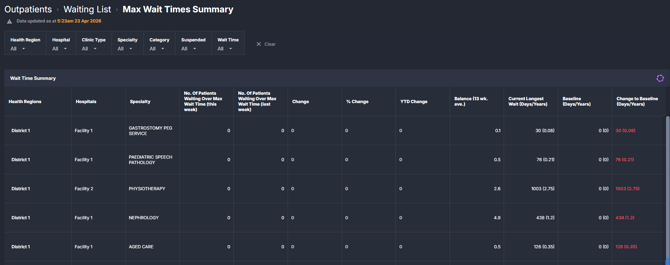
The Maximum Waiting Times Summary component provides an overview of outpatient waiting list performance against maximum wait time thresholds. It summarises how many patients are waiting beyond the selected threshold, alongside the longest waits and week-on-week changes.
The view is organised by health region, hospital, and specialty, enabling comparison across services and over time.
Why it matters
Understand where long waits are occurring and how they are changing over time.
This component supports monitoring of patients waiting beyond defined maximum timeframes and highlights variation across specialties and sites.
- Identify specialties or hospitals with high numbers of long-wait patients
- Track week-on-week and year-to-date changes in long waits
- Monitor the longest waiting patients within each service
- Support visibility of waiting list pressure across the organisation
How to use it
Filter to focus your view
Use the filter bar to refine the data displayed in the summary table:
- Health Region: Filter by geographic region or hospital group
- Hospital: Focus on a specific facility
- Clinic Type: Distinguish between reportable and non-reportable clinics
- Specialty: View a specific outpatient specialty
- Category: Filter by triage category (for example, Urgent, Semi-Urgent, Routine)
- Suspended: Include or exclude suspended patients from the waiting list
- Wait Time: Select the maximum wait time threshold (for example, 10 or 12 weeks, 6, 12, or 15 months, or 4 years)
Review maximum wait time performance
How it works
SystemView aggregates outpatient waiting list data from the source system and applies the selected maximum wait time threshold to identify patients waiting longer than expected.
- Data updates daily in line with source system refresh cycles
- Maximum wait time reflects configured targets (for example, Sláintecare targets in some environments)
- All measures are calculated at a weekly snapshot level to enable comparisons over time
How it helps you
- Monitor long waits: Quickly see how many patients are exceeding maximum timeframes
- Compare performance: Identify variation between hospitals and specialties
- Track change over time: Use week-on-week and YTD changes to assess trends
- Highlight extremes: Identify the longest waiting patients within each service
- Support planning discussions: Provide a consistent view of waiting list pressure
Best practices
How often should I use it?
| What to do | How often | Who typically does this | Why it helps |
|---|---|---|---|
| Review patients over maximum wait time | Daily or weekly | Waiting List Managers, Operational Managers | Maintains awareness of long-wait cohorts |
| Compare week-on-week changes | Weekly | Service Managers, Specialty Leads | Identifies emerging increases or improvements |
| Monitor longest wait by specialty | Weekly | Operational and Executive stakeholders | Highlights areas requiring attention |
| Review trends across hospitals | Monthly | Executives, General Managers | Supports system-level oversight and planning |
Pair with these components
- 🔗 Waiting List > Trends: Understand how the overall waiting list is changing over time
- 🔗 Waiting List > Patient List: Drill into patient-level detail for those exceeding thresholds
- 🔗 Waiting List > Risks & Projections: Identify patients at risk of breaching and future demand
Tips for success
- Adjust the Wait Time filter to align with the target timeframe you are reviewing
- Use Specialty and Hospital filters to isolate areas of concern
- Compare this week vs last week before interpreting longer-term trends
- Use the component alongside patient-level views to support deeper investigation
- Be aware that definitions and thresholds may vary by organisation
FAQs
What does “Maximum Wait Time” refer to?
Maximum wait time refers to the configured target timeframe for outpatient appointments, such as Sláintecare targets in some environments.
Why might values change between weeks?
Changes reflect updates in the underlying waiting list data, including new referrals, bookings, and data corrections from the source system.