
Location in SystemView: Surgery > Chronological Management > Recent Bookings Auditor
In this article
What it is
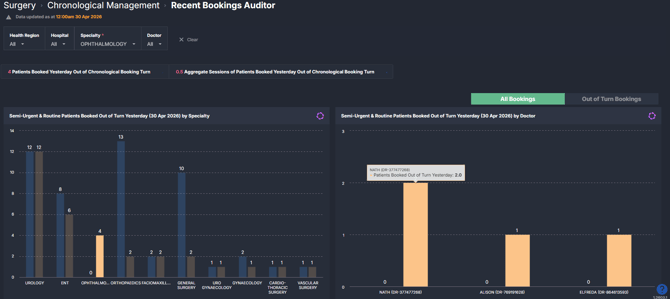
The Recent Bookings Auditor component reviews bookings made over a recent time period (for example, yesterday) and assesses whether they were booked in the correct chronological order.
It highlights patients who were booked out of turn, based on SystemView’s chronological management logic, and allows users to explore this activity by specialty and treating doctor, with drill-through to patient-level detail.
Why it matters
Maintain visibility of booking behaviour and support equitable access to surgery.
This component provides a focused view of recent booking decisions, helping teams understand whether scheduling aligns with chronological booking principles.
- Identify patients who have been booked ahead of others with higher priority or longer waits
- Monitor booking behaviour at specialty and doctor level
- Support consistent and transparent scheduling practices
- Enable timely review and follow-up of recent booking activity
How to use it
Filter to focus your view
Use the filter bar to refine the scope of analysis:
- Health Region: Filter by health service or regional grouping
- Hospital: Focus on a specific facility
- Specialty: Narrow the view to a surgical specialty
These filters apply across all tiles and charts in the component.
Comparing all bookings vs out of turn bookings
Several charts in this component include a toggle between:
- All Bookings
- Out of Turn Bookings
This allows users to shift between two complementary views of the same data:
- All Bookings view shows total booking activity alongside out of turn bookings, helping you understand scale and proportion
- Out of Turn Bookings view isolates only the patients booked out of turn, helping you focus on where attention is needed
For example, in the doctor-level chart:
- The All Bookings view helps identify clinicians with higher overall booking volumes and how many of those are out of turn
- The Out of Turn Bookings view removes overall volume and highlights only the exceptions, making it easier to compare patterns across doctors
This interaction supports a common workflow:
- Start with All Bookings to understand context
- Switch to Out of Turn Bookings to focus on specific cases
- Drill into the patient list to review individual bookings
Data is sourced from surgical waiting list and booking systems and reflects the latest available refresh.
Monitor recent booking activity and identify out of turn patterns
| Tile / Chart Name | What it shows |
|---|---|
| Patients Booked Yesterday Out of Chronological Booking Turn | Total number of patients booked out of turn in the selected period |
| Aggregate Sessions of Patients Booked Yesterday Out of Chronological Booking Turn | Total number of sessions associated with patients booked out of turn |
| Semi-Urgent & Routine Patients Booked Out of Turn Yesterday by Specialty |
Compares total patients booked and those booked out of turn, grouped by specialty to highlight variation across services 💡Tip: a toggle between All Bookings and Out of Turn Bookings compares overall volume against exceptions |
| Semi-Urgent & Routine Patients Booked Out of Turn Yesterday by Doctor |
Displays booking activity by doctor. 💡Tip: a toggle between All Bookings and Out of Turn Bookings compares overall volume against exception |
| Patients Booked Out of Turn Yesterday (Patient List) | Detailed list of patients booked out of turn, including booking order, wait time, procedure, and scheduling details |
| Operation Bookings (comparison table) | Compares booked and unbooked patients for selected procedures, including booking order, timing, and session allocation to support deeper investigation |
How it works
SystemView applies chronological management algorithms to assess whether patients are booked in the appropriate order.
- Patients are prioritised based on clinical urgency (category) and time already waited
- Recent bookings are then evaluated against this priority order
- If a patient is scheduled ahead of others with higher priority or longer waiting time, they are classified as Booked Out of Turn
This component focuses on recent booking activity (for example, yesterday), allowing teams to review decisions shortly after they occur.
How it helps you
- Improve booking equity: Identify where booking order does not align with patient priority and wait time
- Support operational oversight: Monitor booking activity across specialties and clinicians
- Enable timely intervention: Review recent decisions while they are still actionable
- Strengthen transparency: Provide data to support discussions about scheduling practices
- Link to broader performance: Contribute to improved Booked in Turn and Treated in Turn outcomes
Best practices
How often should I use it?
| What to do | How often | Who typically does this | Why it helps |
|---|---|---|---|
| Review out of turn bookings from the previous day | Daily | Surgical booking teams, waiting list coordinators | Enables timely identification and follow-up of booking decisions |
| Compare booking behaviour across specialties | Weekly | Service managers, surgical operations leads | Highlights variation and supports consistent practices |
| Drill into patient-level detail for flagged bookings | As needed | Booking staff, clinical administration teams | Supports validation and understanding of specific cases |
| Use insights to inform scheduling discussions | Ongoing | Clinical leads, operational managers | Encourages alignment with chronological booking principles |
Pair with these components
- 🔗Booked in Turn: Understand overall booking compliance across the waiting list
- 🔗Treated in Turn: Assess whether booking behaviour translates into equitable treatment order
- 🔗Waiting List > Patient List: Review full patient context and booking status
Tips for success
- Focus on patterns over time, not isolated cases
- Use specialty and doctor views to identify variation in booking practices
- Combine with patient-level drill-downs to understand context behind bookings
- Be aware that local processes and data entry practices may influence results
- Use this component as a review and insight tool, not a replacement for local clinical or operational judgement