---
title: Chronological Management > Wait Times
description: Analyse treated surgical waiting times to understand variation across specialties and clinicians, identify long waits, and explore patient-level detail in SystemView.
---
[Skip to content](https://academy.healthcarelogic.com/knowledge/chronological-management-wait-times#main-content)
[Contact Us](https://academy.healthcarelogic.com/knowledge/kb-tickets/new)
[](https://academy.healthcarelogic.com/knowledge)
- [Getting Started](https://academy.healthcarelogic.com/getting-started-with-systemview)
- [Domain Overviews](https://academy.healthcarelogic.com/learning-hub/domain-overviews)
- [On-demand Learning](https://academy.healthcarelogic.com/learning-hub/webinars/australia/on-demand-webinars)
- [Webinars](https://academy.healthcarelogic.com/learning-hub/webinars)
Open main navigation
Close main navigation
- [Getting Started](https://academy.healthcarelogic.com/getting-started-with-systemview)
- [Domain Overviews](https://academy.healthcarelogic.com/learning-hub/domain-overviews)
- [On-demand Learning](https://academy.healthcarelogic.com/learning-hub/webinars/australia/on-demand-webinars)
- [Webinars](https://academy.healthcarelogic.com/learning-hub/webinars)
- [Contact Us](https://academy.healthcarelogic.com/knowledge/kb-tickets/new)
- [Contact Us](https://info.healthcarelogic.com/contact-us)
[Contact Us](https://info.healthcarelogic.com/contact-us)
Search the Knowledge Base
- There are no suggestions because the search field is empty.
1. [SystemView Knowledge Base](https://academy.healthcarelogic.com/knowledge)
2. [Surgery](https://academy.healthcarelogic.com/knowledge/surgery)
3. [Waiting List Management](https://academy.healthcarelogic.com/knowledge/surgery#waiting-list-management)
May 1, 2026
# Chronological Management \> Wait Times
## Understand how long patients waited for surgery and how those wait times vary across specialties and clinicians.
#### **Location in SystemView:** Surgery \> Chronological Management \> Wait Times
**In this article**
- [What it is](https://academy.healthcarelogic.com/knowledge/chronological-management-wait-times#What-it-is)
- [Why it matters](https://academy.healthcarelogic.com/knowledge/chronological-management-wait-times#Why-it-matters)
- [How to use it](https://academy.healthcarelogic.com/knowledge/chronological-management-wait-times#How-to-use-it)
- [How it works](https://academy.healthcarelogic.com/knowledge/chronological-management-wait-times#How-it-works)
- [How it helps you](https://academy.healthcarelogic.com/knowledge/chronological-management-wait-times#How-it-helps)
- [Best practices](https://academy.healthcarelogic.com/knowledge/chronological-management-wait-times#Best-practices)
---
### **What it is**
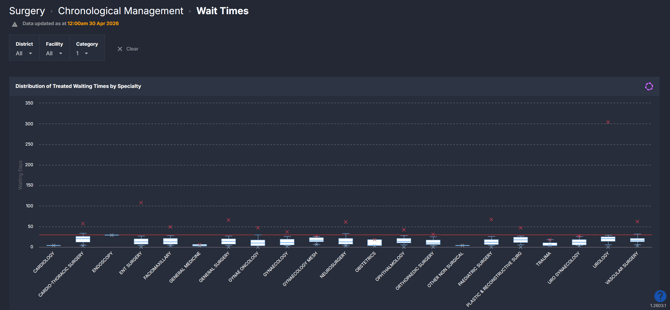
The Wait Times component shows the distribution of **treated waiting times** for surgical patients. It focuses on patients who have already received surgery and analyses how long they waited from being added to the waiting list to treatment.
It presents this information across specialties and doctors, with the ability to drill down to individual patient-level detail.
---
### **Why it matters**
##### *See how long patients are actually waiting and where variation exists.*
Understanding treated wait times helps identify variation in access to surgery and highlights where long waits are occurring.
- Compare wait time distributions across specialties and clinicians
- Identify outliers and unusually long waits
- Assess variation in how patients are treated over time
- Support review of scheduling and treatment patterns
---
### **How to use it**
#### **Filter to focus your view**
Use the filter bar to refine the data displayed across all charts:
- **District**: Filter to a specific district or view all
- **Facility**: Focus on a specific hospital or site
- **Category**: Filter by clinical urgency category (e.g. Category 1, 2, 3)
#### **Explore treated waiting times**
Start at the specialty level to understand overall variation, then drill down:
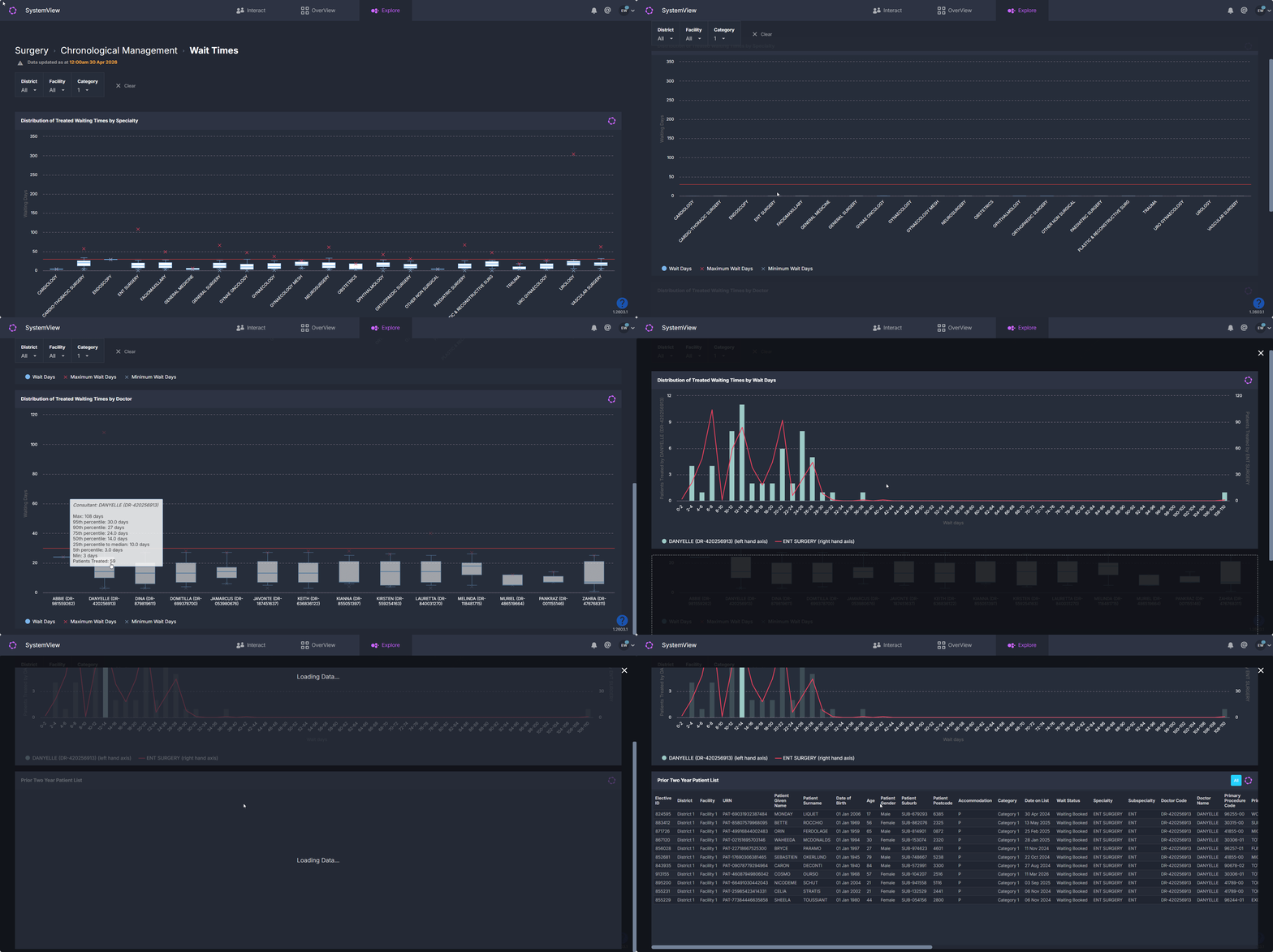
1. Review variation across specialties
2. Select a specialty or doctor to narrow the view
3. Explore distribution patterns and outliers
4. Drill to patient-level detail where needed
#### **Explore treated waiting time distributions**
| Tile / Chart Name | What it shows |
| --- | --- |
| Distribution of Treated Waiting Times by Specialty | A box and whisker chart showing how treated wait times are distributed for each specialty. Displays median, quartiles, and extremes to highlight variation and outliers. |
| Distribution of Treated Waiting Times by Doctor | A box and whisker chart showing variation in treated wait times at an individual doctor level. Enables comparison of typical wait times and spread between clinicians. ***ℹ️Note**: Select a clinician (bar) to open the next chart.* |
| Distribution of Treated Waiting Times by Wait Days | A frequency distribution showing how many patients fall into each wait time band (in days) for the selected doctor. Helps identify where most patients sit and where long waits occur. ***ℹ️Note**: Select a time frame to open the patient list.* |
| Prior Two Year Patient List | A detailed table of patients treated within the selected context, including demographic, clinical, and waitlist information. Supports validation and deeper investigation. |
💡**Tip:** To learn more about understanding the box and whisker charts in SystemView see this article → [How to interpret Box and Whisker charts in SystemView](https://academy.healthcarelogic.com/knowledge/how-to-interpret-the-box-and-whisker-charts) ›
---
### **How it works**
The component analyses **treated patients only**, using historical data from the surgical waiting list and procedure records.
- Wait time is measured as the duration between being placed on the waiting list and receiving surgery
- Data is refreshed regularly based on source system updates
- Selecting a doctor filters the component further, enabling additional charts and patient-level detail
- Box and whisker charts summarise distributions, showing median, spread, and extremes
This structure allows users to move from high-level variation down to individual patient records.
---
### **How it helps you**
- **Identify variation:** See how wait times differ across specialties and clinicians
- **Spot long waits:** Highlight patients or groups with unusually long delays
- **Understand distribution:** Go beyond averages to see the full spread of waiting times
- **Support review:** Use patient-level detail to investigate specific cases or patterns
- **Inform planning discussions:** Provide evidence for reviewing scheduling and demand
---
### **Best practices**
#### How often should I use it?
| What to do | How often | Who typically does this | Why it helps |
| --- | --- | --- | --- |
| Review wait time variation by specialty | **Weekly** | Surgical service managers, operational managers | Identifies emerging variation and pressure points |
| Compare clinician-level distributions | **Weekly or fortnightly** | Clinical directors, specialty leads | Supports understanding of variation across clinicians |
| Investigate long wait outliers | **As needed** | Booking teams, waiting list coordinators | Enables targeted review of individual cases |
| Validate patient-level detail | **As needed** | Administrative and data teams | Confirms accuracy and supports audit processes |
#### **Pair with these components**
- **🔗** [**Treated in Turn**](https://academy.healthcarelogic.com/knowledge/surgery-chronological-management-treated-in-turn): Assess whether treatment occurred in chronological order
- **🔗** [**Waiting List \> Trends**](https://academy.healthcarelogic.com/knowledge/surgery-waiting-list-trends): Monitor how the current waiting list is evolving over time
#### **Tips for success**
- Use specialty-level views first before drilling into doctors
- Focus on the **shape of distributions**, not just median values
- Pay attention to maximum values to identify extreme waits
- Use the patient list to validate and investigate patterns seen in charts
- Be aware that local data definitions and inclusion rules may vary between sites
- [Getting Started](https://academy.healthcarelogic.com/knowledge/getting-started#main-content)
- [Welcome & Introduction](https://academy.healthcarelogic.com/knowledge/getting-started#welcome-introduction)
- [Access & Account Setup](https://academy.healthcarelogic.com/knowledge/getting-started#access-account-setup)
- [Basic Navigation & Layout](https://academy.healthcarelogic.com/knowledge/getting-started#basic-navigation-layout)
- [FAQs & Troubleshooting](https://academy.healthcarelogic.com/knowledge/getting-started#faqs-troubleshooting)
- [Interact](https://academy.healthcarelogic.com/knowledge/interact#main-content)
- [Interact Basics](https://academy.healthcarelogic.com/knowledge/interact#interact-basics)
- [Customising SystemView](https://academy.healthcarelogic.com/knowledge/interact#customising-systemview)
- [Sharing & Duplicating Content](https://academy.healthcarelogic.com/knowledge/interact#sharing-duplicating-content)
- [Using Notifications & Improvement Tools](https://academy.healthcarelogic.com/knowledge/interact#using-notifications-improvement-tools)
- [Surgery](https://academy.healthcarelogic.com/knowledge/surgery#main-content)
- [Introduction & Terminology](https://academy.healthcarelogic.com/knowledge/surgery#introduction-terminology)
- [Waiting List Management](https://academy.healthcarelogic.com/knowledge/surgery#waiting-list-management)
- [Scheduling & Booking Management](https://academy.healthcarelogic.com/knowledge/surgery#scheduling-booking-management)
- [Performance & Activity Analysis](https://academy.healthcarelogic.com/knowledge/surgery#performance-activity-analysis)
- [Emergency Surgery](https://academy.healthcarelogic.com/knowledge/surgery#emergency-surgery)
- [FAQs & Troubleshooting](https://academy.healthcarelogic.com/knowledge/surgery#faqs-troubleshooting)
- [Outpatients](https://academy.healthcarelogic.com/knowledge/outpatients#main-content)
- [Introduction & Terminology](https://academy.healthcarelogic.com/knowledge/outpatients#introduction-terminology)
- [Waiting List Management](https://academy.healthcarelogic.com/knowledge/outpatients#waiting-list-management)
- [Referral Management](https://academy.healthcarelogic.com/knowledge/outpatients#referral-management)
- [Wait Times](https://academy.healthcarelogic.com/knowledge/outpatients#wait-times)
- [Demand & Capacity Planning](https://academy.healthcarelogic.com/knowledge/outpatients#demand-capacity-planning)
- [Bookings & Reviews](https://academy.healthcarelogic.com/knowledge/outpatients#bookings-reviews)
- [Clinic Effectiveness & Appointment Outcomes](https://academy.healthcarelogic.com/knowledge/outpatients#clinic-effectiveness-appointment-outcomes)
- [Virtual Learning & Tools](https://academy.healthcarelogic.com/knowledge/outpatients#virtual-learning-tools)
- [Beds](https://academy.healthcarelogic.com/knowledge/beds#main-content)
- [Introduction & Foundations](https://academy.healthcarelogic.com/knowledge/beds#introduction-foundations)
- [Inpatient Demand & Capacity](https://academy.healthcarelogic.com/knowledge/beds#inpatient-demand-capacity)
- [Complex Patients Management](https://academy.healthcarelogic.com/knowledge/beds#complex-patients-management)
- [Risk of Hospitalisation & Readmissions](https://academy.healthcarelogic.com/knowledge/beds#risk-of-hospitalisation-readmissions)
- [Length of Stay & Inpatient Flow](https://academy.healthcarelogic.com/knowledge/beds#length-of-stay-inpatient-flow)
- [Inpatient Occupancy Forecaster](https://academy.healthcarelogic.com/knowledge/beds#inpatient-occupancy-forecaster)
- [Emergency Department](https://academy.healthcarelogic.com/knowledge/emergency-department#main-content)
- [Introduction & Foundations](https://academy.healthcarelogic.com/knowledge/emergency-department#introduction-foundations)
- [Department Now](https://academy.healthcarelogic.com/knowledge/emergency-department#department-now)
- [Flow Monitor](https://academy.healthcarelogic.com/knowledge/emergency-department#flow-monitor)
- [Performance Trends & Analytics](https://academy.healthcarelogic.com/knowledge/emergency-department#performance-trends-analytics)
- [Virtual Learning & Tools](https://academy.healthcarelogic.com/knowledge/emergency-department#virtual-learning-tools)
- [FAQs & Troubleshooting](https://academy.healthcarelogic.com/knowledge/emergency-department#faqs-troubleshooting)
- [SystemView 2](https://academy.healthcarelogic.com/knowledge/systemview-2)
- [System Administration](https://academy.healthcarelogic.com/knowledge/system-administration)
- [Patient Cohorts](https://academy.healthcarelogic.com/knowledge/patient-cohorts#main-content)
- [Beds](https://academy.healthcarelogic.com/knowledge/patient-cohorts#beds)
- [Emergency Department](https://academy.healthcarelogic.com/knowledge/patient-cohorts#emergency-department)
- [Release Notes](https://academy.healthcarelogic.com/knowledge/release-notes)
[](https://healthcarelogic.com/)
[mailto:customersuccess@healthcarelogic.com](mailto:customersuccess@healthcarelogic.com)
© 2026 HealthCare Logic. All rights reserved
**Didn't find what you were looking for?**
[Raise a support ticket](https://academy.healthcarelogic.com/knowledge/kb-tickets/new) and our team will come back to you. For guided training try the [Learning Hub](https://academy.healthcarelogic.com/learning-hub), or catch up on a [past webinar](https://academy.healthcarelogic.com/learning-hub/webinars).