
Location in SystemView: SystemView > Explore > Emergency Department > Department Now > Discharge Situation Report
In this article:
What it is
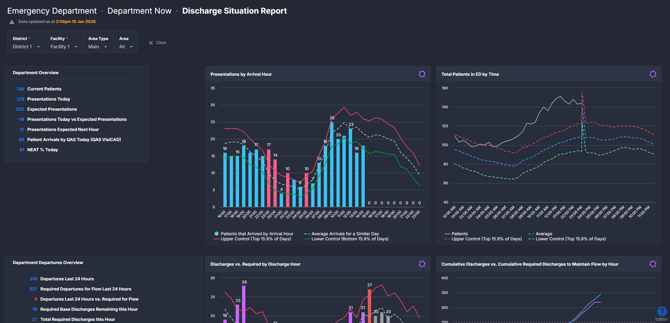
The Discharge Situation Report provides a near real-time view of Emergency Department discharges compared with what is required to maintain patient flow. It combines arrivals, occupancy, and discharge activity to highlight hourly trends, shortfalls, and upcoming discharge needs across the day.
This component is designed to support time-critical ED operational awareness by showing how well outflow is keeping up with inflow.
Why it matters
ED crowding often emerges when discharges fall behind arrivals.
When discharges fall behind arrivals, pressure can build quickly, increasing crowding and risk. This component helps teams move from reactive escalation to earlier awareness by:
-
Showing whether discharge activity is keeping pace with arrivals hour by hour
-
Highlighting emerging discharge shortfalls before congestion escalates
-
Providing historical context to understand what is typical for a similar day
-
Supporting shared situational awareness between ED, patient flow, and inpatient teams
How to use it
Filter to focus your view
Use the filters to tailor the component to the ED areas relevant to your role:
-
Area Type: Filter to Main or other mapped ED area types.
-
Area: Select one or more ED areas such as Triage, Acute, or Minors.
Monitor discharge pressure and flow balance
How it works
The Discharge Situation Report uses arrival, discharge, and occupancy data from local ED source systems and refreshes on a rolling basis throughout the day.
Component logic overview
At a high level:
-
Arrivals and discharges are tracked hour by hour across a rolling 24-hour window.
-
The level of discharging required to maintain flow is inferred from recent arrival patterns and historical behaviour for similar days.
-
Historical trends provide context to show whether current performance is within, above, or below what is typically observed.
The component is intended to support interpretation and discussion, rather than define targets or prescribe actions.
How it helps you
-
Early identification of discharge pressure: See shortfalls before crowding escalates.
-
Improved flow conversations: Support clearer, data-informed discussions with patient flow and inpatient teams.
-
Better timing awareness: Understand when discharge performance tends to lag during the day.
-
Shared situational view: Align ED operational awareness around inflow, outflow, and occupancy.
Best practices
How often should I use it
| What to do | How often | Who should do it | Why it helps |
| Review discharge vs. required trends | Throughout the shift | Nurse in Charge, Flow Coordinator | Supports early identification of discharge pressure and timely escalation. |
| Check cumulative discharge position | Several times per shift | ED leadership, Patient Flow leads | Helps track whether shortfalls are being recovered as the day progresses. |
| Use alongside arrivals and occupancy | During peak periods | ED operational leads | Provides context to understand whether pressure is driven by inflow, outflow, or both. |
Pair with these components and features
- 🔗 Department Now > Situation Report: For a broader real-time view of ED demand and pressure.
- 🔗 Department Now > Waiting for Admission: To understand the impact of discharge performance on admitted patients.
- 🔗 Flow Monitor > Live Patient Flow: Supports whole-of-hospital context for inpatient capacity
- 🔗 Beds > Inpatient Flow Monitor: To align ED discharge needs with inpatient capacity and flow.
Tips for success
-
Focus on patterns across multiple hours rather than reacting to a single data point.
- Review the required discharges for each hour to understand when discharge effort needs to increase to keep pace with arrivals and reduce the risk of downstream pressure.
-
Use the cumulative view to understand whether earlier discharge gaps are being recovered.
-
Combine discharge insights with arrival peaks to anticipate upcoming pressure.
-
Use the component to support coordination, not as a performance scorecard.
Want a detailed breakdown?
If you’d like a more detailed look at every filter, chart, and tile in this component, you can download the Discharge Situation Report Guide below.
📎 Download: Emergency Department > Department Now > Discharge Situation Report Guide
❔FAQs
Q. What does “required discharges” mean in this component?
A. Required discharges indicate the level of discharging needed to maintain patient flow, inferred from recent arrival patterns. Hourly arrival volumes are used as a proxy for discharge pressure, with historical context from similar days shown (based on the past two years) to indicate what is typical for that time and setting.
Q. Does this apply to all ED areas?
A. The view reflects the Area Type and Area filters selected. Ensure these match the ED areas relevant to your role.