---
title: Clinic Effectiveness > FTA / DNA Trends
description: Track outpatient non-attendance trends across specialties, clinics, and doctors. Drill into weekly and patient-level data to reduce non-attendance and improve clinic efficiency.
---
[Skip to content](https://academy.healthcarelogic.com/knowledge/outpatients-clinic-effectiveness-fta-dna-trends#main-content)
[Contact Us](https://academy.healthcarelogic.com/knowledge/kb-tickets/new)
[](https://academy.healthcarelogic.com/knowledge)
- [Getting Started](https://academy.healthcarelogic.com/getting-started-with-systemview)
- [Domain Overviews](https://academy.healthcarelogic.com/learning-hub/domain-overviews)
- [On-demand Learning](https://academy.healthcarelogic.com/learning-hub/webinars/australia/on-demand-webinars)
- [Webinars](https://academy.healthcarelogic.com/learning-hub/webinars)
Open main navigation
Close main navigation
- [Getting Started](https://academy.healthcarelogic.com/getting-started-with-systemview)
- [Domain Overviews](https://academy.healthcarelogic.com/learning-hub/domain-overviews)
- [On-demand Learning](https://academy.healthcarelogic.com/learning-hub/webinars/australia/on-demand-webinars)
- [Webinars](https://academy.healthcarelogic.com/learning-hub/webinars)
- [Contact Us](https://academy.healthcarelogic.com/knowledge/kb-tickets/new)
- [Contact Us](https://info.healthcarelogic.com/contact-us)
[Contact Us](https://info.healthcarelogic.com/contact-us)
Search the Knowledge Base
- There are no suggestions because the search field is empty.
1. [SystemView Knowledge Base](https://academy.healthcarelogic.com/knowledge)
2. [Outpatients](https://academy.healthcarelogic.com/knowledge/outpatients)
3. [Clinic Effectiveness & Appointment Outcomes](https://academy.healthcarelogic.com/knowledge/outpatients#clinic-effectiveness-appointment-outcomes)
November 14, 2025
# Clinic Effectiveness \> FTA / DNA Trends
## Track and understand failed-to-attend (FTA) / did-not-attend (DNA) patterns across your outpatient clinics.
#### **Location in SystemView:** SystemView \> Explore \> Outpatients \> Clinic Effectiveness \> FTA / DNA Trends
**In this article:**
- [What it is](https://academy.healthcarelogic.com/knowledge/outpatients-clinic-effectiveness-fta-dna-trends#whatitis)
- [Why it matters](https://academy.healthcarelogic.com/knowledge/outpatients-clinic-effectiveness-fta-dna-trends#whyitmatters)
- [How to use it](https://academy.healthcarelogic.com/knowledge/outpatients-clinic-effectiveness-fta-dna-trends#howtouseit)
- [How it works](https://academy.healthcarelogic.com/knowledge/outpatients-clinic-effectiveness-fta-dna-trends#howitworks)
- [How it helps you](https://academy.healthcarelogic.com/knowledge/outpatients-clinic-effectiveness-fta-dna-trends#howithelpsyou)
- [Best practices](https://academy.healthcarelogic.com/knowledge/outpatients-clinic-effectiveness-fta-dna-trends#bestpractices)
- [FAQs / Troubleshooting](https://academy.healthcarelogic.com/knowledge/outpatients-clinic-effectiveness-fta-dna-trends#faqs)
---
### **What it is**
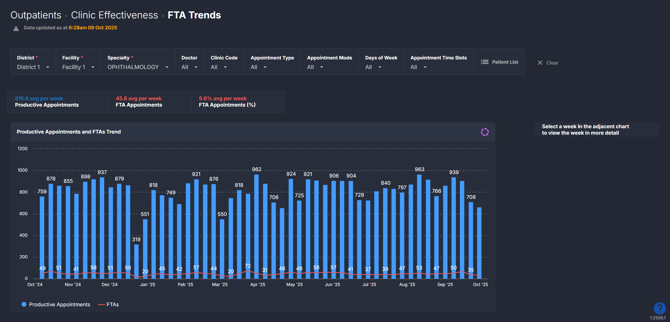
The **FTA / DNA Trends** component helps you monitor patient non-attendance across clinics, doctors, and appointment types. It highlights when and where non-attendance is occurring and allows you to drill down for deeper insight - right down to individual patient records.
---
### **Why it matters**
##### *See when and where non-attendance is impacting clinic activity.*
- Identify non-attendance patterns across time, specialty, and doctor.
- Understand which clinics or sessions experience the highest no-show rates.
- Support demand management by analysing the impact of non-attendance on productive appointments.
- Use patient-level data to support targeted improvement strategies.
---
### **How to use it**
#### **Filter to focus your view**
Use filters to narrow your analysis to specific services or clinic contexts:
- **Specialty:** Focus on a specific clinical specialty.
- **Doctor:** View non-attendance trends by individual doctor or resources.
- **Clinic Code:** Focus on a specific clinic or location.
- **Appointment Type:** Filter by new or review appointments.
- **Appointment Mode:** Distinguish between in-person, telehealth, or other modes.
- **Days of Week:** View data for selected clinic days.
- **Appointment Time Slots:** Narrow to specific times of day or session slots.
#### **Explore non-attendance trends and clinic activity**
The first page in this component provides a high-level overview of FTAs/DNAs across your selected filters.
| **Tile name** | **What is shows** |
| --- | --- |
| Summary Tiles | Snapshot of average productive appointments per week, average FTAs / DNAs, and the average percentage of FTAs/DNAs per week. |
| Productive Appointments and FTAs/DNAs Trend | Trend of total productive vs FTA / DNA appointments over time to identify patterns in clinic activity. |
💡***Tip:** Add these to a [**MyHub ›**](https://academy.healthcarelogic.com/knowledge/what-is-myhub) alongside other Clinic Effectiveness components tiles and charts to build a complete view of your outpatient activity.*
#### **Dive deeper into a selected week**
Click into a week on the Productive Appointments and FTAs/DNAs Trend chart to explore more detailed trends and doctor-level patterns.
| **Chart name** | **What it shows** |
| --- | --- |
| Productive Appointments and FTAs/DNAs by Doctor | Breakdown of total productive appointments and FTAs/DNAs by each doctor for the selected week. |
| Productive Appointment Schedule | Visual schedule of appointment distribution and FTAs/DNAs by day and time (AM or PM) |
| Productive Appointments and FTAs/DNAs by Clinic | Comparison of productive appointments and FTA/DNA counts by clinic. \**Only appears when you select a day and time slot on the Productive Appointment Schedule.* |
| Productive Appointments and FTAs/DNAs Trend | Weekly trendline for productive appointments and FTAs/DNAs for the selected day and time slot (e.g., if you click Tuesday AM, it will show the last 12 months of Tuesday morning appointments and FTAs/DNAs). |
To return to the main overview, click **Clear filters and return** at the top of the component.
***💡 Tip:** Appointments by Clinic and FTAs/DNAs Trend only display after selecting a specific day and time slot on the FTA Appointment Schedule.*
#### **Explore patient-level insights**
Click on the **Patient List** at the top of the component to explore appointment-level detail for the past 12 months or the selected week.
This list displays all **productive (attended) appointments** as well as appointments that were **not attended**. FTAs/DNAs are clearly flagged in red within the *Appointment Result* column so you can easily spot non-attenders.
At the end of the table, you’ll also see two summary columns showing:
- **Number of reviews** the patient has had in this specialty over the past **2 years**.
- **Number of FTAs/DNAs** the patient has had over the past **2 years**.
This is particularly useful for identifying patients with a **high rate of non-attendance** who may be suitable for **discharge** to free up capacity for other patients. This table is perfect for reporting or analysing patient data — and can be easily exported to Excel for deeper review. See [How do I export charts and tables ›](https://academy.healthcarelogic.com/knowledge/how-do-i-export-charts-and-tables).
---
### **How it works**
The component analyses scheduled outpatient appointments and compares total booked and attended appointments to those recorded as failed-to-attend. When you drill into a week, the charts refresh to display the selected week’s FTA activity across clinics, doctors, and time slots.
#### **Calculation logic**
- **FTA / DNA rate =** (Number of failed-to-attend appointments ÷ Total booked appointments) × 100
- **Productive appointments** = Completed appointments excluding DNAs/cancellations.
---
### **How it helps you**
- **Spot attendance issues early:** Identify trends in patient non-attendance.
- **Improve booking efficiency:** Understand when and where FTAs/DNAs most often occur.
- **Optimise clinic schedules:** Adjust session times based on attendance patterns.
- **Enhance patient follow-up:** Use patient-level data to target reminders or outreach.
- **Monitor service impact:** Quantify how FTAs/DNAs affect clinic productivity.
---
### **Best practices**
#### **How often should I use it**
| **What to do** | **How often** | **Who should do it** | **Why it helps** |
| --- | --- | --- | --- |
| Review FTA/DNA rates and trends | **Weekly** | Clinic Managers, Admin Teams | Spot emerging patterns in non-attendance. |
| Drill down by doctor or clinic | **As needed** | Service Leads, Outpatient Managers | Identify teams or time slots with higher FTA/DNA rates. |
| Export patient list for audits | **Monthly** | Admin Teams | Support follow-up and outreach initiatives. |
#### **Pair with these components**
- **🔗 [Clinic Effectiveness \> New & Review Appointments](https://academy.healthcarelogic.com/knowledge/outpatients-clinic-effectiveness-new-and-review-appointments):** Compare FTA/DNA patterns to productive appointment trends and identify if certain appointment types are driving non-attendance.
- **🔗 [Clinic Effectiveness \> Cancellations](https://academy.healthcarelogic.com/knowledge/outpatients-clinic-effectiveness-cancellations):** Understand how cancellations and FTAs/DNAs together affect overall appointment loss and capacity.
- **🔗 [Demand & Activity](https://academy.healthcarelogic.com/knowledge/outpatients-demand-activity):** See how FTAs/DNAs impact your actual activity versus expected demand.
- **🔗** [**Interact \> My Hub**](https://academy.healthcarelogic.com/knowledge/what-is-myhub)**:** Combine FTA/DNA tiles and charts with other *Clinic Effectiveness* metrics to create a customised dashboard showing your full outpatient picture. See [How to create a MyHub ›](https://academy.healthcarelogic.com/knowledge/how-to-create-and-edit-a-myhub) for instructions.
#### **Tips for success**
- **Filter by specialty or clinic:** Focus on areas where FTAs/DNAs are known to be higher.
- **Drill into busy weeks:** Identify time slots or doctors with consistently high FTA/DNA counts.
- **Export regularly:** Use the patient list for monthly review or reporting.
- **Combine with Cancellations data:** Get a full picture of appointment gaps and lost time.
---
#### **Want a detailed breakdown?**
If you’d like a more detailed look at every filter, chart, and tile in this component, you can download the **FTA / DNA Trends Guide** below.
📎 **Download:** [Clinic Effectiveness \> FTA / DNA Trends](https://academy.healthcarelogic.com/hubfs/Outpatients%20-%20Clinic%20Effectiveness_FTA-DNA%20Trends_Guide.pdf)
---
### **❓FAQs / Troubleshooting**
**Q. Why are some clinics not showing FTAs/DNAs?**
A. Check your filters and confirm that data exists for the selected date range. If you believe FTAs are occurring but none appear, it may be a **data entry issue** - SystemView relies on appointments being **correctly flagged as ‘Failed to Attend’** in your hospital’s source system.
**Q. How do I return to the overview after I've clicked into a week?**
A. Click **‘Clear filters and return’** at the top of the component to go back.
- [Getting Started](https://academy.healthcarelogic.com/knowledge/getting-started#main-content)
- [Welcome & Introduction](https://academy.healthcarelogic.com/knowledge/getting-started#welcome-introduction)
- [Access & Account Setup](https://academy.healthcarelogic.com/knowledge/getting-started#access-account-setup)
- [Basic Navigation & Layout](https://academy.healthcarelogic.com/knowledge/getting-started#basic-navigation-layout)
- [FAQs & Troubleshooting](https://academy.healthcarelogic.com/knowledge/getting-started#faqs-troubleshooting)
- [Interact](https://academy.healthcarelogic.com/knowledge/interact#main-content)
- [Interact Basics](https://academy.healthcarelogic.com/knowledge/interact#interact-basics)
- [Customising SystemView](https://academy.healthcarelogic.com/knowledge/interact#customising-systemview)
- [Sharing & Duplicating Content](https://academy.healthcarelogic.com/knowledge/interact#sharing-duplicating-content)
- [Using Notifications & Improvement Tools](https://academy.healthcarelogic.com/knowledge/interact#using-notifications-improvement-tools)
- [Surgery](https://academy.healthcarelogic.com/knowledge/surgery#main-content)
- [Introduction & Terminology](https://academy.healthcarelogic.com/knowledge/surgery#introduction-terminology)
- [Waiting List Management](https://academy.healthcarelogic.com/knowledge/surgery#waiting-list-management)
- [Scheduling & Booking Management](https://academy.healthcarelogic.com/knowledge/surgery#scheduling-booking-management)
- [Performance & Activity Analysis](https://academy.healthcarelogic.com/knowledge/surgery#performance-activity-analysis)
- [Emergency Surgery](https://academy.healthcarelogic.com/knowledge/surgery#emergency-surgery)
- [FAQs & Troubleshooting](https://academy.healthcarelogic.com/knowledge/surgery#faqs-troubleshooting)
- [Outpatients](https://academy.healthcarelogic.com/knowledge/outpatients#main-content)
- [Introduction & Terminology](https://academy.healthcarelogic.com/knowledge/outpatients#introduction-terminology)
- [Waiting List Management](https://academy.healthcarelogic.com/knowledge/outpatients#waiting-list-management)
- [Referral Management](https://academy.healthcarelogic.com/knowledge/outpatients#referral-management)
- [Wait Times](https://academy.healthcarelogic.com/knowledge/outpatients#wait-times)
- [Demand & Capacity Planning](https://academy.healthcarelogic.com/knowledge/outpatients#demand-capacity-planning)
- [Bookings & Reviews](https://academy.healthcarelogic.com/knowledge/outpatients#bookings-reviews)
- [Clinic Effectiveness & Appointment Outcomes](https://academy.healthcarelogic.com/knowledge/outpatients#clinic-effectiveness-appointment-outcomes)
- [Virtual Learning & Tools](https://academy.healthcarelogic.com/knowledge/outpatients#virtual-learning-tools)
- [Beds](https://academy.healthcarelogic.com/knowledge/beds#main-content)
- [Introduction & Foundations](https://academy.healthcarelogic.com/knowledge/beds#introduction-foundations)
- [Inpatient Demand & Capacity](https://academy.healthcarelogic.com/knowledge/beds#inpatient-demand-capacity)
- [Complex Patients Management](https://academy.healthcarelogic.com/knowledge/beds#complex-patients-management)
- [Risk of Hospitalisation & Readmissions](https://academy.healthcarelogic.com/knowledge/beds#risk-of-hospitalisation-readmissions)
- [Length of Stay & Inpatient Flow](https://academy.healthcarelogic.com/knowledge/beds#length-of-stay-inpatient-flow)
- [Inpatient Occupancy Forecaster](https://academy.healthcarelogic.com/knowledge/beds#inpatient-occupancy-forecaster)
- [Emergency Department](https://academy.healthcarelogic.com/knowledge/emergency-department#main-content)
- [Introduction & Foundations](https://academy.healthcarelogic.com/knowledge/emergency-department#introduction-foundations)
- [Department Now](https://academy.healthcarelogic.com/knowledge/emergency-department#department-now)
- [Flow Monitor](https://academy.healthcarelogic.com/knowledge/emergency-department#flow-monitor)
- [Performance Trends & Analytics](https://academy.healthcarelogic.com/knowledge/emergency-department#performance-trends-analytics)
- [Virtual Learning & Tools](https://academy.healthcarelogic.com/knowledge/emergency-department#virtual-learning-tools)
- [FAQs & Troubleshooting](https://academy.healthcarelogic.com/knowledge/emergency-department#faqs-troubleshooting)
- [SystemView 2](https://academy.healthcarelogic.com/knowledge/systemview-2)
- [System Administration](https://academy.healthcarelogic.com/knowledge/system-administration)
- [Patient Cohorts](https://academy.healthcarelogic.com/knowledge/patient-cohorts#main-content)
- [Beds](https://academy.healthcarelogic.com/knowledge/patient-cohorts#beds)
- [Emergency Department](https://academy.healthcarelogic.com/knowledge/patient-cohorts#emergency-department)
- [Release Notes](https://academy.healthcarelogic.com/knowledge/release-notes)
[](https://healthcarelogic.com/)
[mailto:customersuccess@healthcarelogic.com](mailto:customersuccess@healthcarelogic.com)
© 2026 HealthCare Logic. All rights reserved
**Didn't find what you were looking for?**
[Raise a support ticket](https://academy.healthcarelogic.com/knowledge/kb-tickets/new) and our team will come back to you. For guided training try the [Learning Hub](https://academy.healthcarelogic.com/learning-hub), or catch up on a [past webinar](https://academy.healthcarelogic.com/learning-hub/webinars).