
Location in SystemView: SystemView > Explore > Patient Cohorts > Emergency Department > Current Patients & Recent Trends
In this article:
What it is
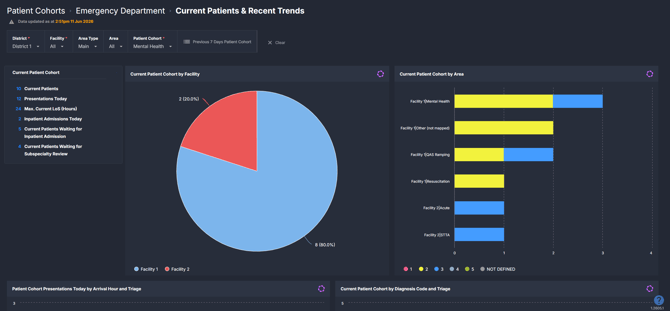
Current Patients & Recent Trends provides a real-time view of all current ED patients within a selected patient cohort, alongside recent 7-day presentation and activity trends. It brings together operational indicators, flow metrics, and patient-level detail to help teams understand current demand, case mix, and triage patterns. The component also supports short-term historical review, making it useful for both in-the-moment decisions and recent trend analysis.
Why it matters
See who is in your ED right now, and understand the patterns shaping today's activity.
ED teams often rely on verbal updates, manual counts, or walkthroughs to understand current department status. This component consolidates that information into a single, data-driven view, updated in real time from source system data. It reduces the need for manual information gathering and supports more timely, informed responses to emerging pressure.
- Understand the current composition and volume of a patient cohort without manually reviewing individual records.
- Identify where demand and acuity are concentrated across facilities, areas, and triage categories.
- Recognise emerging patterns in arrival times, diagnoses, and flow outcomes from the past seven days.
- Support clinical review, escalation decisions, and operational planning with a consistent, shared view of the department.
How to use it
Filter to focus your view
Use the following filters to tailor the component to your area of interest:
- Facility - Narrow the view to a single facility or hospital.
- Area Type - Select between All, Main, or Other mapped areas within the ED.
- Area - Filter to specific areas within the ED, such as Triage, Acute, or Minors.
- Patient Cohort - Select the patient cohort to apply across all tiles and charts in the component.
 A Previous 7 Days Patient Cohort button is also available. Selecting this displays a detailed table listing all patients from the selected cohort who presented to the ED in the past seven days, including key clinical and arrival information.
 Monitor current patients and recent cohort trends
The following tiles and charts are available in this component:
How it works
Current Patients & Recent Trends draws on data from the underlying hospital source system. The current patient tiles and charts reflect the live state of the ED at the time of the most recent data refresh. The 7-day trend charts draw on presentation data from the past seven days, relative to the current date.
How it helps you
-
Real-time situational awareness: The component provides a consolidated, up-to-date view of who is currently in the ED, reducing reliance on verbal updates, physical walkthroughs, or manual counts.
-
Cohort-focused analysis: By applying a patient cohort, teams can focus on specific populations such as Frequent Presenters, Paediatrics, or other locally defined groups, making it easier to identify patterns relevant to those patients.
-
Triage and acuity visibility: Charts broken down by triage category make it easier to assess the urgency and clinical complexity of current and recent presentations at a glance.
-
Flow outcome review: Departure code and admission status breakdowns help teams understand how patients are moving through and out of the ED, and the downstream demand being placed on inpatient services.
-
Short-term trend review: The 7-day trend tiles allow teams to identify recent changes in demand volume, case mix, or flow patterns without needing to navigate to a separate trend component.
Best practices
How often should I use it
| What to do | How often | Who typically does this | Why it helps |
|---|---|---|---|
| Review current patient cohort summary and patient-level detail | Multiple times per shift | Nurse in Charge, Flow Coordinators, ED Consultants on Shift | Maintains awareness of current cohort composition, acuity, and patients waiting for admission or specialist review |
| Check arrival hour and triage chart | At the start of each shift or during peak periods | Nurse in Charge, Flow Coordinators | Supports staffing decisions and early identification of peak demand periods |
| Review 7-day trend charts | Daily or at the start of a shift | ED Nursing Director, ED Medical Director, Business Practice Improvement Officers | Identifies emerging patterns in demand, case mix, or flow outcomes that may inform short-term planning |
| Monitor departure code and admission status breakdowns | Daily | Flow Coordinators, Patient Flow Lead / Manager / Coordinator | Helps assess downstream impacts on inpatient services and identify cohort-level flow trends |
Pair with these components
- 🔗 ED > Department Now > Situation Report - Provides a broader real-time view of the whole ED, useful when reviewing the current cohort in the context of overall department status.
- 🔗 ED > Flow Monitor > Live Patient Flow - Supports more detailed analysis of patient movement and flow patterns alongside the cohort-level view.
- 🔗 ED > NEAT / ELOS / PET Analysis - Use alongside recent trend data to understand how this cohort's presentations may be influencing access target performance.
- 🔗 Beds > Inpatient Flow Monitor > Hospital Overview - Useful for understanding inpatient bed availability when patients in the cohort are waiting for admission.
- Use the Patient Cohort filter to narrow the view to the specific group most relevant to your role or current planning need.
Tips for success
- Use the Previous 7 Days Patient Cohort button to access the full patient-level table for recent cohort presentations. This is particularly useful when reviewing Frequent Presenter cohorts or preparing for operational or clinical discussions.
- The Max Current LoS (Hours) metric in the Current Patient Cohort tile reflects the single longest current stay. Consider reviewing the Current Patient Cohort Details table to identify which patients are contributing to extended lengths of stay.
- Suburb and diagnosis breakdowns in the 7-day charts are limited to the top 25 entries. If a specific suburb or diagnosis is not visible, it may fall outside the top 25 for the selected cohort and time period.
- Data in this component reflects the most recent refresh from the source system. Check the data timestamp at the top of the component if real-time accuracy is critical to a decision.
Want a detailed breakdown?
If you’d like a more detailed look at every filter, chart, and tile in this component, you can download the Patient Cohorts ED - Current Patients & Recent Trends guide below.
📎 Download: Patient Cohorts > ED > Current Patients & Recent Trends Guide
❓FAQs
Q: Why are some area or facility breakdowns showing as "Not Defined" or "Not Mapped"?
A: Patients assigned to areas or facilities that have not been mapped in SystemView's configuration will appear under "Not Defined" or similar labels. This reflects a configuration or source system mapping issue rather than a data error. Contact your SystemView administrator if you believe an area or facility should be mapped.
Q: The Previous 7 Days charts show a different date range than expected. Why?
A: The 7-day window is calculated relative to the current date at the time of the data refresh. If the data was last refreshed at a specific point in time, the range will reflect the seven days prior to that refresh. Check the data timestamp at the top of the component to confirm the currency of the displayed data.